

Learning how to check a suspected deepfake video can protect you from scams, misinformation, and mistaken accusations. Imagine receiving a video of a family member asking for emergency money. The face looks right, the voice sounds familiar, and the message feels urgent. Yet the clip may have been created or changed with artificial intelligence.
Modern AI tools can generate realistic faces, copy voices, and alter what people appear to say. Some fakes contain obvious errors, while others look completely natural. This guide covers nine warning signs, shows you how to verify a video’s source, and explains what to do when you find a fake. You will also learn why no single clue or detector can prove authenticity on its own. For background on the threat itself, the FBI’s Internet Crime Complaint Center publishes current fraud guidance.
New to this topic? Our AI security guide for beginners is a good place to start.
Table of Contents
- What Is a Deepfake Video?
- How to Spot a Suspected Deepfake Video: 9 Warning Signs
- How to Verify a Suspected Deepfake Video Step by Step
- Deepfake Detection Tools and How to Read Results
- How to Check a Suspected Deepfake Video During a Live Call
- What to Do If You Find a Suspected Deepfake
- Deepfake Verification Checklist: How to Check a Suspected Deepfake Video Before Sharing
- Frequently Asked Questions About How to Check a Suspected Deepfake Video
- Final Thoughts on Checking a Suspected Deepfake Video
What Is a Deepfake Video?
A deepfake video uses artificial intelligence to generate or manipulate footage. It can make a person appear to say or do something that never happened. It can also create a realistic person or scene that never existed. For example, a fake clip might show an executive approving a payment.
[IMAGE 1: deepfake-vs-misleading-edit-comparison.webp]
Deepfakes do not always cause harm. Parody, education, and entertainment projects also use AI-generated video. Ordinary editing can mislead too. A genuine recording that is shortened, slowed down, or stripped of context can deceive viewers without any AI at all. The real question is whether the footage, its source, and its claims can be independently verified.
How to Spot a Suspected Deepfake Video: 9 Warning Signs
No single sign proves manipulation. However, each one shows you where to look more closely. This section explains what to watch for when you learn how to check a suspected deepfake video.
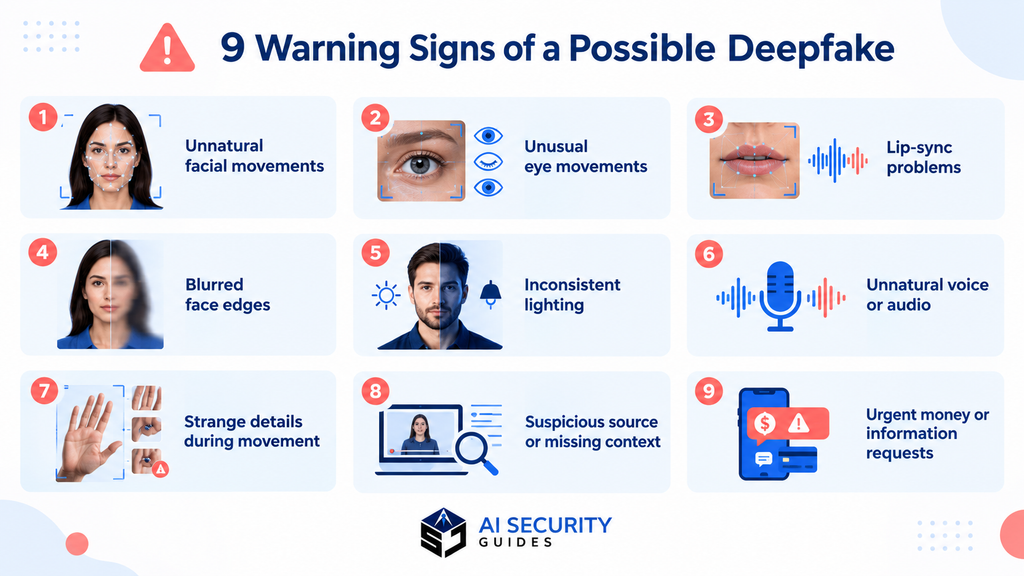
1. Unnatural Facial Movements in a Suspected Deepfake Video
Watch the face while the person speaks, turns, or changes expression. Look for sudden shape shifts, flickering near the cheeks, or expressions that do not match the conversation. Check the eyes too. Unusual blinking alone proves nothing, because compression and weak recording quality can distort normal movement.
2. Lip-Sync Problems That Can Reveal a Fake Video
Compare mouth movements with the audio. Pay close attention to sounds such as “m,” “b,” and “p,” which require the lips to close. A repeated mismatch deserves a closer look.
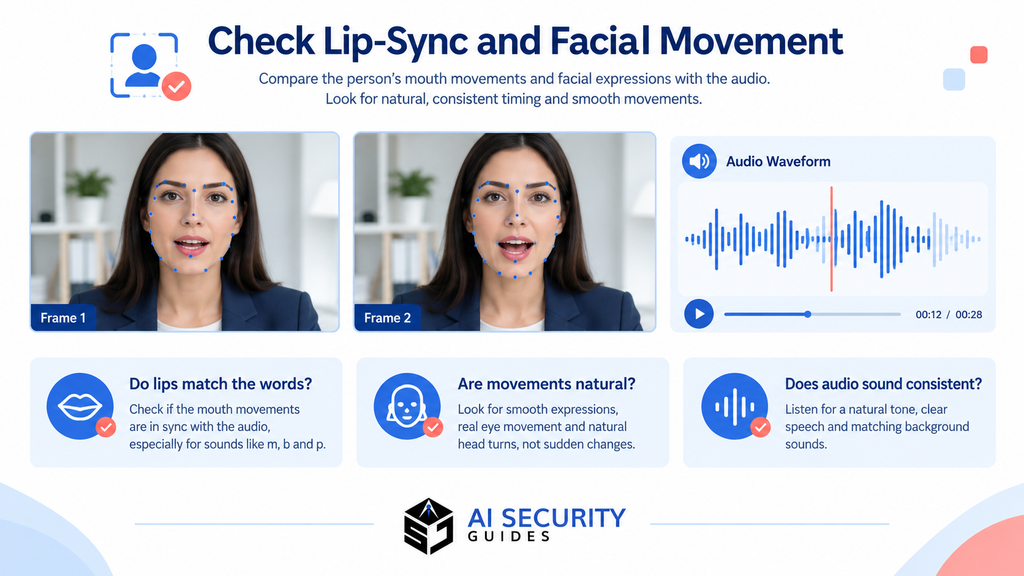
Replay the clip before you draw conclusions. A slow connection or an editing error can also throw audio out of sync.
3. Blurred Edges Around the Face or Hair
Examine where the face meets the hair, ears, neck, and background. Flickering edges, unusual blur, or skin tones that shift between face and neck can signal manipulation. Low-resolution footage can create similar edges in genuine videos, so compare carefully.
4. Inconsistent Lighting and Shadows
Compare the light on the face with the light in the room. If the room is lit from one side but the face glows from the other, look more closely. Shadows under the nose and chin offer further clues. Filters can cause similar effects, so combine this check with others.
5. A Voice That Does Not Sound Natural
Listen for odd pauses, sudden emotional shifts, and background sounds that do not fit the scene. A slightly robotic voice is not enough on its own. Noise reduction and cheap microphones can affect real recordings too. If the audio asks for money, verify it through a separate channel.
6. Strange Details During Movement
Watch hands, teeth, ears, clothing, and objects when the person raises a hand or turns their head. Fused fingers, shifting objects, or details that flicker between frames deserve scrutiny. Many deepfakes show no visible mistakes, so a clean-looking video does not confirm authenticity.
7. Unusual Text, Logos, or Reflections
Read any visible signs, labels, or on-screen text. Letters that look distorted or change between frames are worth noting. Check whether reflections move in line with the head and the room’s light. Treat these as supporting clues, since blur and ordinary editing produce similar effects.
8. Missing Context or a Suspicious Source
Ask who originally published the video and whether the account impersonates a real person or organization. Is the clip unusually short? Search for a few distinctive phrases from the video, adding “fact check” or the person’s name. This step also exposes misleading edits, which can show a real person while creating a false impression.
9. Urgent Requests for Money or Personal Information
Be cautious when a video pressures you to act immediately. A supposed manager might request a confidential payment, or a familiar person might ask for a password. Urgency does not prove a fake. It is, however, a clear reason to stop and verify.
How to Verify a Suspected Deepfake Video Step by Step
Visual checks only go so far when you learn how to check a suspected deepfake video. Work through these steps to build a stronger picture.
Find the Original Source of a Suspected Deepfake Video
Start with the account, website, or message where you found the video. Check the posting date, account history, and caption. A repost does not reveal who created the footage. If the clip claims to show an official announcement, look for it on the organization’s verified channel.
Use Reverse Image Search on a Suspicious Clip
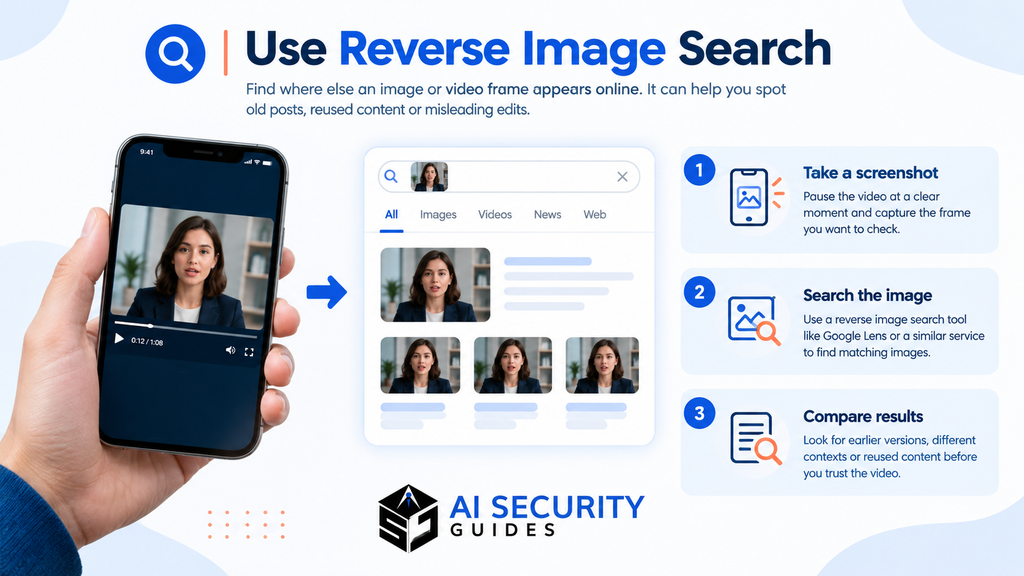
Pause the video on a clear frame that shows a recognizable face or location. Take a screenshot and search it with Google Lens. Compare any matches with the clip you received. An older interview or reused footage may appear. However, a new deepfake may have no matches, so this method has limits.
Confirm Important Claims Independently
Do not rely on the video alone. If a clip appears to show a company director approving a payment, contact that director through a number you already trust. Never use contact details supplied in the suspicious message. For authoritative background, the joint guidance from CISA, the NSA, and the FBI on deepfake threats to organizations is a useful starting point.
Deepfake Detection Tools and How to Read Results
Detection tools can offer a second opinion when you check a suspected deepfake video, but they are not final proof. Results depend on video quality and the manipulation method used.
| Tool type | Example | Best use | Main limitation |
|---|---|---|---|
| Research platform | DeepFake-o-meter | Testing a clip against research detectors | Access and instructions may change |
| Verification toolkit | InVID-WeVerify | Extracting keyframes and tracing online footage | Requires manual investigation |
| Commercial service | TruthScan, Copyleaks | Quick media analysis, where video is supported | Video support and free tiers vary |
Check current availability and privacy terms before uploading footage that contains private conversations or faces. If two tools disagree, do not choose the result you prefer. Return to the source instead.
Research also supports caution. A 2024 systematic review and meta-analysis of 56 studies reported average human accuracy of about 55.5% on deepfake detection tasks. That figure is a study-level average, not a prediction for any individual. The NIST AI 100-4 report on reducing risks posed by synthetic content discusses the limits of detection and the value of provenance signals.
How to Check a Suspected Deepfake Video During a Live Call
A live call can feel convincing, but a face on screen does not confirm identity. If a caller asks for money, confidential data, or account changes, take these steps:
- End the call and contact the person using a number you already know.
- Follow your organization’s approval process for payments and sensitive requests.
- Never share passwords or verification codes, even on a convincing call.
Audio delays and visual glitches can also come from weak network connections. Avoid jumping to conclusions, but do not let technical explanations override your verification steps.
What to Do If You Find a Suspected Deepfake
Avoid sharing the video while you investigate, even to warn others, because reposting can increase its reach. Save the link, account name, and date. Report the content through the platform’s impersonation or manipulated-media process. Warn the person or organization being impersonated through a verified channel. If money or account access is involved, contact your bank promptly. Knowing how to check a suspected deepfake video is only the first step; protecting your accounts comes next.
Deepfake Verification Checklist: How to Check a Suspected Deepfake Video Before Sharing
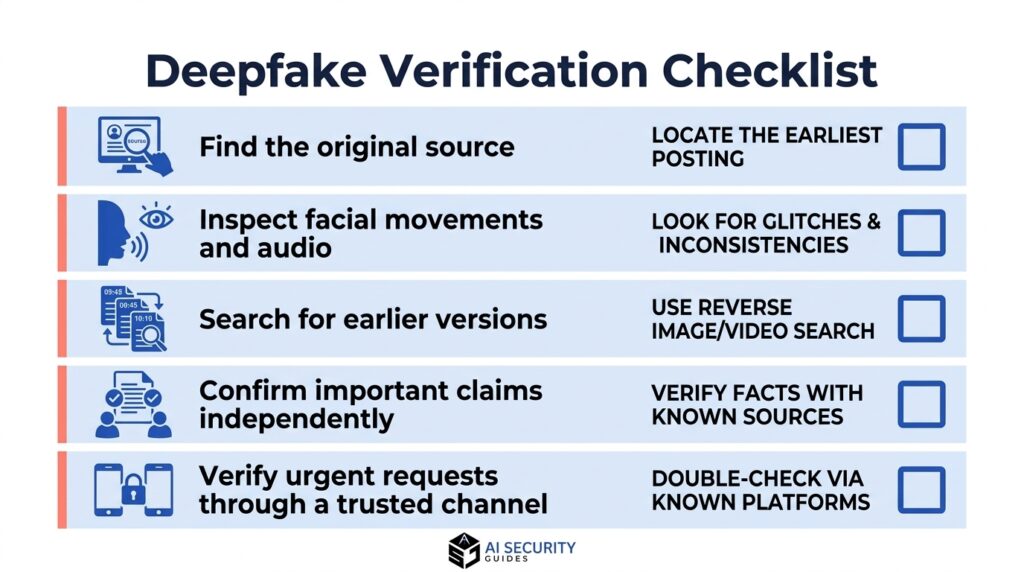
Before you trust or share a suspicious video, confirm each item:
- I have identified the original source, if possible.
- I have checked the date, caption, and surrounding context.
- I have reviewed facial movement and lip-sync, without treating them as proof.
- I have searched for earlier versions or matching frames.
- I have confirmed the main claim through an independent source.
- I have verified any request for money or sensitive information through a separate channel.
Frequently Asked Questions About How to Check a Suspected Deepfake Video
How to Check a Suspected Deepfake Video on My Phone?
Yes. Pause the clip, zoom in, listen closely, take screenshots, and run a reverse image search. Then check the original source. Phone checks may miss sophisticated manipulation, so combine several methods.
Are Deepfake Detection Tools Always Accurate?
No. Accuracy depends on the manipulation type, the video quality, and the tool’s method. Treat any detection score as supporting evidence only.
Does Poor Video Quality Mean a Video Is Fake?
No. Genuine videos can be blurry, compressed, or poorly lit. Look for a better-quality original before you draw conclusions.
What Is the Difference Between a Deepfake and a Misleading Edit?
A deepfake uses AI to generate or alter media. A misleading edit uses ordinary techniques, such as cropping or rearranging real footage. Both can deceive, so always check the original context.
What Should I Do If a Family Member Asks for Money in a Video?
Do not send money based on the video alone. Contact your family member through a number you already trust. If the request turns out to be fraudulent, preserve the evidence and report it to the platform and your bank.
Final Thoughts on Checking a Suspected Deepfake Video
Knowing how to check a suspected deepfake video means more than spotting strange eyes or blurry edges. Those clues help you decide when to investigate, but they cannot prove authenticity by themselves. Start with the source, examine the footage and audio, search for earlier versions, and confirm important claims independently. Pause before you trust or share any video that could affect someone’s money, reputation, or safety.
Note: I could not open https://aisecurityguides.com/ in this reply, so no internal links are inserted. Add them after the site is checked.