

Hypothetical example: you open an email from your bank at 7 a.m. The logo looks right, the tone sounds calm, and the grammar is perfect. It claims someone tried to sign in, so it asks you to confirm your identity within the hour. AI phishing emails polished like this one fool careful people every day.
Phishing is a scam in which criminals pose as a trusted sender to steal your information. Years ago, spelling mistakes gave away most of these messages. Today, however, AI tools can write clean, friendly text in seconds. As a result, a professional tone no longer proves a message is real.
This guide shows you how to verify a convincing message in five steps. Along the way, you will learn which red flags still work, see three hypothetical examples, and get a checklist to save. The advice draws on guidance from the FBI, CISA, and the FTC.
Table of Contents
- Why AI Phishing Emails Polished by Chatbots Fool So Many People
- Old Warning Signs vs. What AI Changes
- Red Flags That Still Appear in AI Phishing Emails Polished to Perfection
- How to Verify AI Phishing Emails Polished Enough to Fool You
- Hypothetical Examples of AI Phishing Emails Polished for Work and Banking
- Quick Checklist Before You Click
- What to Do If You Clicked an AI Phishing Email
- Frequently Asked Questions About AI Phishing Emails
- Conclusion: Verify First, Trust Second
Why AI Phishing Emails Polished by Chatbots Fool So Many People
Generative AI is software that creates new text, images, or audio from a short instruction. Criminals also use it to write scam messages faster and with fewer mistakes. According to an FBI public service announcement, this technology cuts the time and effort that criminals spend on deception. The same alert says it also helps them avoid the usual signs of fraud.
Three changes make AI phishing emails polished enough to pass a quick glance. First, the writing is fluent, so spelling checks no longer help you. Second, a message can mention your job, your city, or a recent purchase. Third, scammers can produce many different versions, so basic filters struggle to match known bad text.
Personal details often come from leaked data or public profiles. If your address appeared in an old breach, you may receive more targeted messages. Therefore, check whether your email appeared in a data breach and share less online by following our guide to protecting your personal information online. Phishing also belongs to a wider wave of AI scams that target everyday people.
Old Warning Signs vs. What AI Changes
Many beginners learned a short list of red flags. Against AI phishing emails polished by software, some of those signs still help, while others have lost most of their value. The table below compares the old advice with today’s reality.

| Old warning sign | What AI changes | What to do now |
|---|---|---|
| Spelling and grammar mistakes | AI writes clean, fluent text | Judge the request, not the polish |
| A generic greeting such as “Dear customer” | AI can add your name and details | Treat personal details as unproven |
| An awkward or robotic tone | AI can imitate a brand or a boss | Verify the sender, not the style |
| One message sent to everyone | AI can tailor text to a role or purchase | Ask whether the request fits your real life |
| An unfamiliar sender address | AI does not change this clue | Still check the full address and domain |
In short, polish proves nothing. Both a criminal and a real company can send a flawless email. Therefore, old warning signs alone cannot protect you from AI phishing emails polished by software.
Red Flags That Still Appear in AI Phishing Emails Polished to Perfection
Even the best writing cannot hide what the sender wants from you. Therefore, judge the request, not the style. CISA advises that you resist clicking suspicious links or attachments and report the message instead. Watch for these signs:
- A deadline or threat that pushes you to act immediately
- A request for passwords, one-time codes, Social Security numbers, or payment details
- A link or attachment you did not expect
- New bank details on an invoice or payment request
- A sender who claims to be someone you know but writes from an unusual address
The FTC adds that phishing messages often tell a story, such as suspicious sign-in attempts, account problems, or a fake invoice. A single sign may not prove anything. However, a convincing message often combines two or three of them. For example, a flawless invoice that also changes the bank account deserves immediate verification.
How to Verify AI Phishing Emails Polished Enough to Fool You
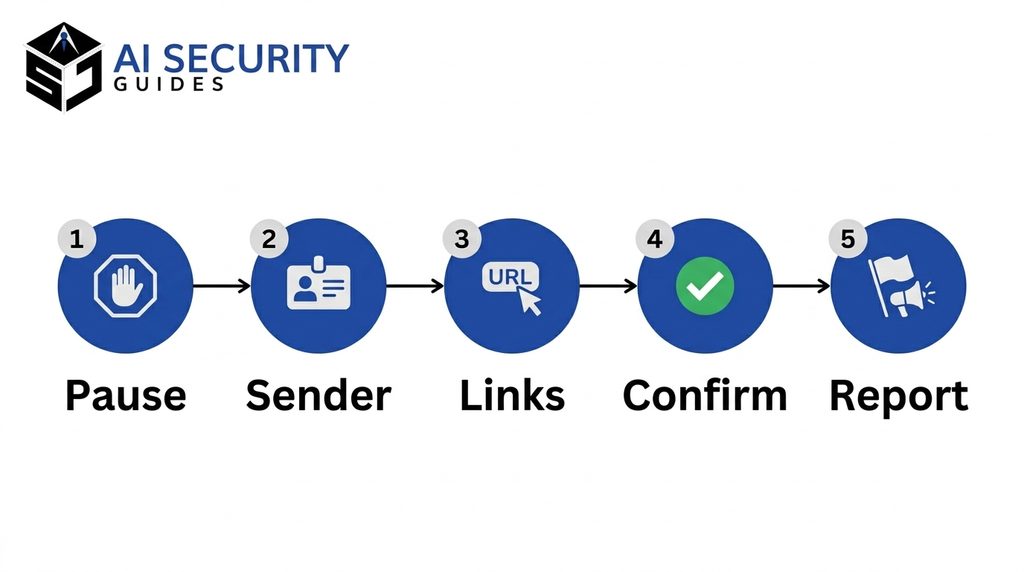
You do not need technical skills to verify a suspicious message. You need a calm routine that you follow every time. The five steps below take about two minutes, and they work for emails, texts, and direct messages. Use this routine whenever AI phishing emails polished to look official land in your inbox.
Step 1: Pause Before You Respond
Scammers rely on speed, because they want you to react before you think. Therefore, stop for ten seconds and ask three questions.
Did you expect this message? What does it want you to do? What happens if you wait an hour? A real bank, employer, or delivery service will still be there after you check.
Step 2: Check the Sender of a Polished Phishing Email
First, look at the full email address, not just the display name. A display name such as “Your Bank Support” can hide an address from an unrelated domain. A domain is the part after the @ symbol, and it should match the company’s real website.
Also watch for lookalike spellings, such as an extra letter or a swapped character. CISA’s phishing page describes a worker who missed that an email did not come from the vendor’s real domain.
Step 3: Inspect Links Without Clicking
On a computer, hover your mouse over a link to preview its destination. On a phone, press and hold the link to see the address. Then compare it with the company’s real website. If the address looks odd, do not click.

Instead, open a new browser tab and type the website yourself, or use the company’s official app. Your password manager can help too, because it usually refuses to fill in a login on a site it does not recognize. Likewise, never open an unexpected attachment, even when the message looks polished.
Step 4: Confirm Through a Second Channel
Contact the sender through a method you already trust. For example, call the number on your card, your bill, or the company’s official website. Never use the phone number or link inside the email.
If the message claims to come from a coworker or relative, call or text that person directly. This step matters most when money changes hands, because voice cloning scams can imitate people you know. At work, set a rule that any payment change needs a second approval.
Step 5: Report the Message, Then Delete It
If you suspect phishing, do not reply or forward the message to friends. Instead, use the report spam or report phishing button in your email app, as CISA recommends. Reporting even AI phishing emails polished to look flawless helps protect you and others.
You can also report scams to the FTC at ReportFraud.ftc.gov. If you lost money, file a complaint with the FBI’s Internet Crime Complaint Center at ic3.gov. Finally, delete the message.
Hypothetical Examples of AI Phishing Emails Polished for Work and Banking
These three hypothetical examples show how AI phishing emails polished for different situations can look. Each one includes the red flag and the safe response.
Hypothetical example 1: your manager appears to email you before a client meeting. Then she asks you to buy gift cards and send the codes today. The tone matches her style, because AI tools can copy a writing style from a few public posts. The red flags are the unusual payment request and the rush, so call her directly before you do anything.
Hypothetical example 2: a message from your bank reports a $482 charge at a store you do not recognize. It also includes a button labeled Dispute Charge. The email is flawless, but the button leads to an address that is not your bank’s website. Skip the button, open your bank’s official app, and check your recent transactions.
Hypothetical example 3: a delivery notice says your package is on hold until you pay a $1.95 fee. The small amount feels harmless, which can lower your guard. However, the payment page asks for your full card details. Track the package inside the retailer’s own app instead.
Quick Checklist Before You Click

Save this checklist and run through it whenever a message feels urgent, personal, or slightly off. It also helps you verify AI phishing emails polished enough to look legitimate. Each item should be a clear yes before you act.
- I expected this message, or I verified it another way.
- The full sender address and domain match the real company.
- The message does not demand secrecy, speed, or an unusual payment.
- Hovering over each link shows the company’s real website.
- I confirmed the request through a phone number or app I already trust.
- I did not share passwords, one-time codes, or financial details.
- I reported the message and deleted it.
What to Do If You Clicked an AI Phishing Email
Mistakes happen, even to experts. If one of the AI phishing emails polished for your inbox gets past you, quick action limits the damage. Work through these steps in order.

- If you only opened the page, close it and do not enter anything.
- If you typed a password, change it immediately on the real site and on every account that reuses it.
- Turn on multifactor authentication, which adds a second sign-in step such as a code sent to your phone.
- Review your bank and card statements, and call your bank about any charge you do not recognize.
- If you opened an attachment, run a security scan and watch for signs of malware.
- If you think scammers reached your inbox, follow our steps for an email account hacked recovery.
- Report the message to the FTC or the FBI, as described in Step 5.
Acting quickly matters more than feeling embarrassed. Every report also helps protect other people.
Frequently Asked Questions About AI Phishing Emails
Can AI Phishing Emails Polished With Perfect Grammar Still Be Spotted?
Yes. Perfect grammar proves nothing, but the request still gives the scam away. Check the sender’s domain, the link destination, and whether the message pushes you to act fast. When AI phishing emails polished to perfection still ask for secrets or payments, verify through a second channel.
Are AI-Written Phishing Emails More Dangerous Than Older Scams?
AI phishing emails polished by software can be more convincing, but they work the same way. They still need you to click, reply, pay, or share information. The FBI says generative AI mainly makes fraud faster and more believable. Your verification routine blocks both old and new versions.
Can Spam Filters Stop Every Phishing Email?
No. The FTC notes that spam filters may keep many phishing emails out of your inbox, but not all of them. Keep your filter on. Even so, verify every unexpected request.
Should I Reply to Ask Whether an Email Is Real?
No. A reply also tells the sender that your address is active, and the scammer controls the answer. Instead, contact the company or person through a trusted phone number or app.
Where Do I Report a Phishing Email?
Start with the report spam or report phishing option in your email app. Next, file a report with the FTC at ReportFraud.ftc.gov. If you lost money, add a complaint with the FBI’s Internet Crime Complaint Center at ic3.gov.
Conclusion: Verify First, Trust Second
AI phishing emails polished to perfection will keep improving, but your defense stays simple. Therefore, ignore how professional a message looks. Focus on what it asks you to do, and verify it through a channel you already trust.
Use the five steps and the checklist whenever a message feels urgent. Even AI phishing emails polished for your exact job lose their power when you verify before you act. With practice, verifying a convincing message takes minutes, and it can save you from a costly mistake.