


If you want to check whether your email appeared in a data breach, you can do it for free in under a minute. First, open a trusted breach checker such as Have I Been Pwned and type in your email address. Next, read the list of breaches it shows. Finally, change the affected passwords and turn on two-factor authentication.
However, most people stop after the first search. As a result, they see a red warning and panic, or a green result and relax too early. Therefore, this guide shows you how to run the check, how to read the result, and what to do next, step by step.
Quick answer: Enter your email at haveibeenpwned.com. If it appears in a breach, change that account’s password, change any reused passwords, and enable two-factor authentication (2FA).
Table of Contents
- What does it mean if your email appeared in a data breach?
- How to see if your email is in a data breach, step by step
- How to read your breach results
- Best free data leak checkers
- Is Have I Been Pwned safe?
- What to do if your email has been pwned
- How to check if your phone number or personal information was leaked
- What if your email is not found?
- Frequently asked questions
What Does It Mean If Your Email Appeared in a Data Breach?
A data breach happens when someone gets unauthorized access to a company’s systems and steals user data. In addition, data can leak without any hacking at all. For example, a company may store a database online without a password, and anyone can find it.
First, it helps to know the basic terms:
- Breach: a company’s systems are attacked and data is stolen.
- Leak: data becomes public by mistake, such as an exposed database.
- Hack: someone actually breaks into your account.
This difference matters. Your email showing up in a breach does not mean your account was hacked. Instead, it means a service you used lost control of its data. Still, the risk is real, because attackers reuse leaked emails and passwords to try other websites. Security experts call this credential stuffing.
What information can be exposed?
Depending on the service, a breach can include your email address, password (often scrambled), name, phone number, home address, date of birth, and sometimes payment or ID details. Consequently, the danger depends on what leaked, not just that it leaked.
How to See If Your Email Is in a Data Breach (Step by Step)
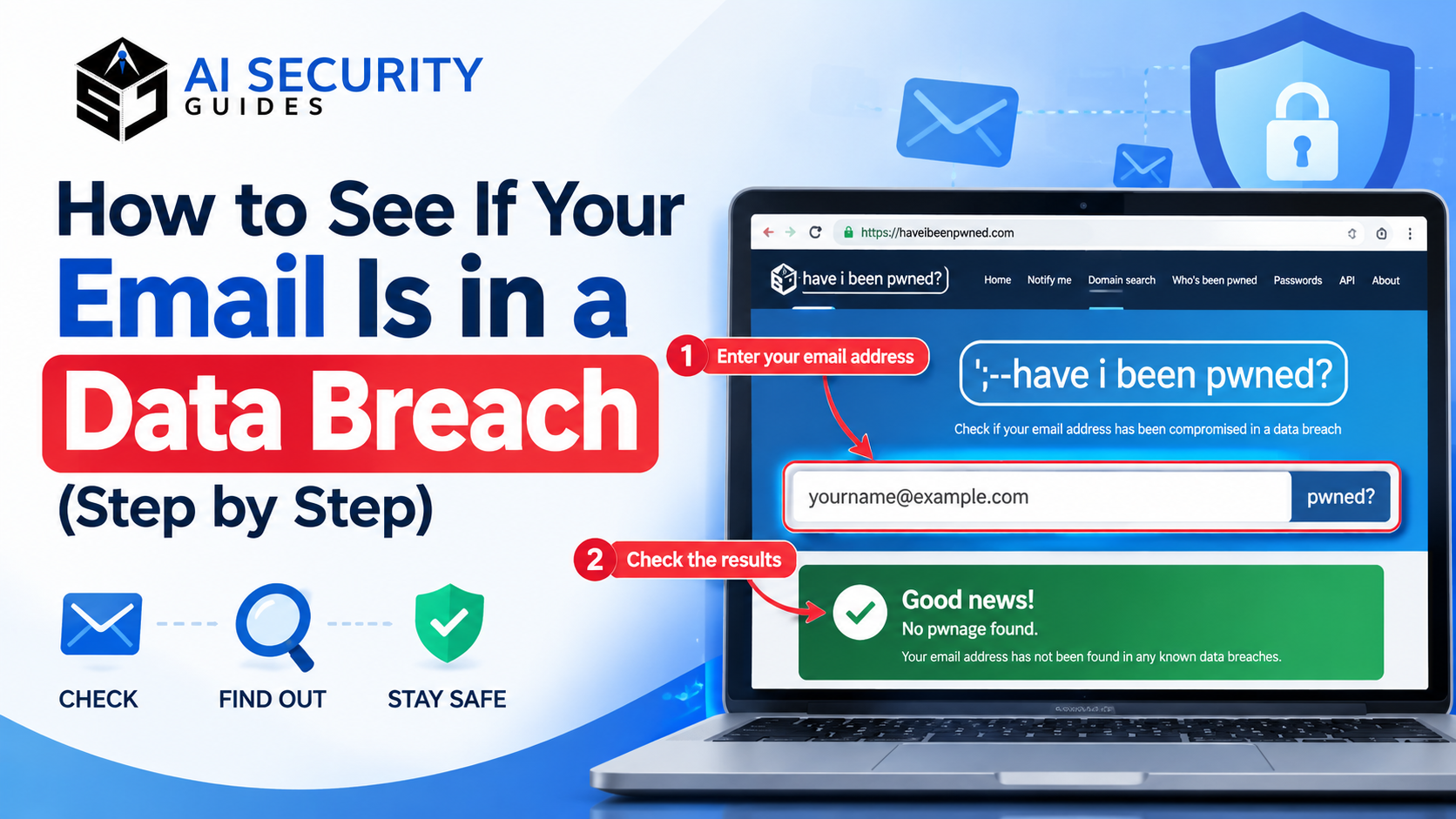
The easiest way to see if your email is in a data breach is to use Have I Been Pwned (HIBP). It is free, it is run by security researcher Troy Hunt, and security teams around the world use it. Here is how to do a data check on your email address:
- Open haveibeenpwned.com by typing the address yourself.
- Enter your email address in the search box and press the search button.
- Read the result. Green means no known breach. Red means your email was found.
- Scroll through the breach list. Each entry shows the website, the date, and the type of data exposed.
- Turn on alerts with the “Notify me” option, so you hear about future breaches.
- Repeat the check for every email address you use, including old ones.
Tip: Check your old email addresses too. Accounts you forgot about are often the ones with the weakest passwords.
How to Read Your Breach Results
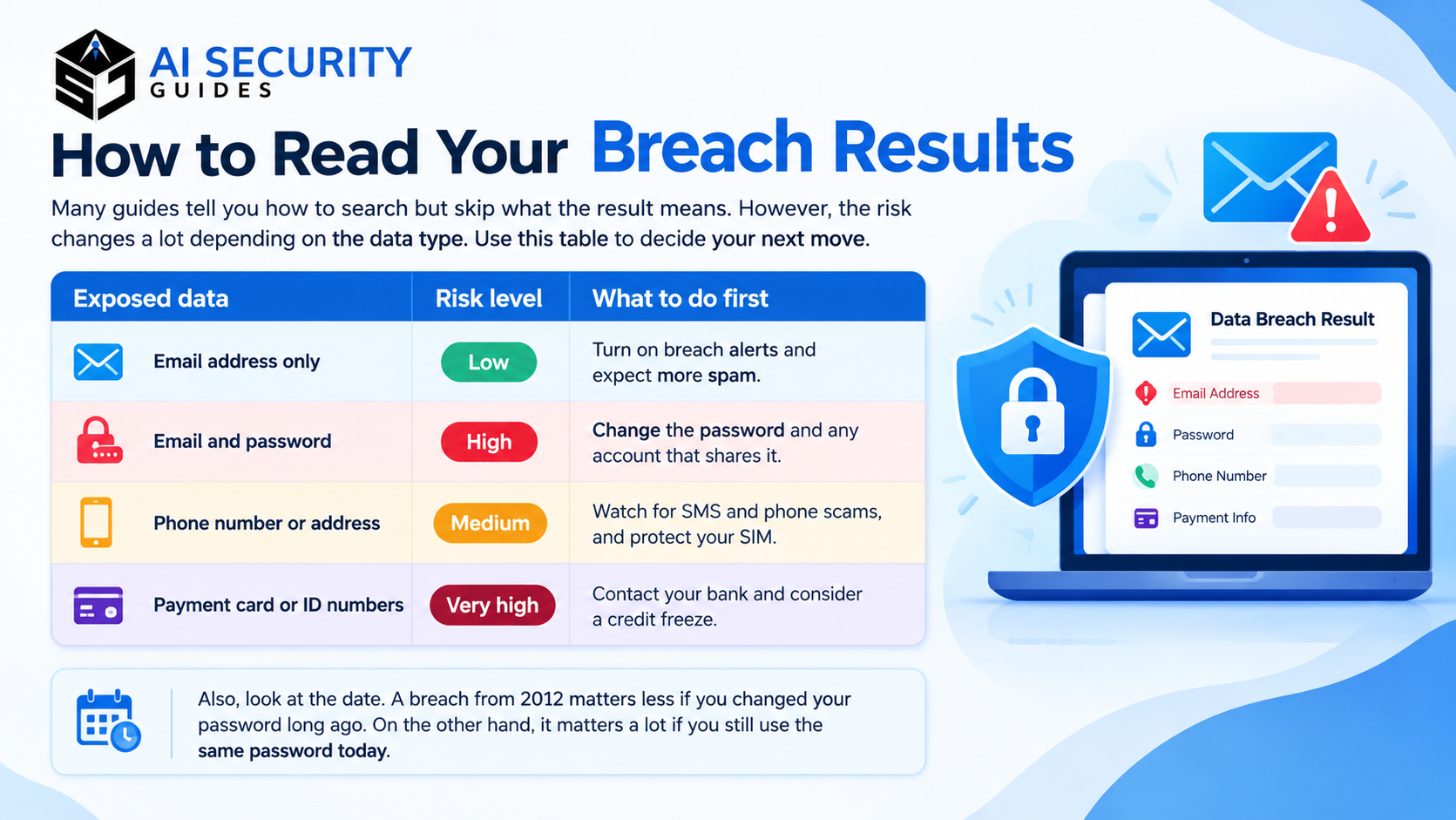
Many guides tell you how to search but skip what the result means. However, the risk changes a lot depending on the data type. Use this table to decide your next move.
| Exposed data | Risk level | What to do first |
|---|---|---|
| Email address only | Low | Turn on breach alerts and expect more spam |
| Email and password | High | Change the password and any account that shares it |
| Phone number or address | Medium | Watch for SMS and phone scams, and protect your SIM |
| Payment card or ID numbers | Very high | Contact your bank and consider a credit freeze |
Also, look at the date. A breach from 2012 matters less if you changed your password long ago. On the other hand, it matters a lot if you still use the same password today.
Best Free Data Leak Checkers
You can check whether your email appeared in a data breach with several tools. Each one has a different purpose, so choose the one that fits your need.
| Tool | What it checks | Cost | Best for |
|---|---|---|---|
| Have I Been Pwned | Email addresses against a large database of known breaches | Free | Quick email checks and alerts |
| Mozilla Monitor | Breach alerts for your email, built on HIBP data | Free | Ongoing monitoring of up to 20 email addresses |
| Pwned Passwords (on HIBP) | Whether a password has appeared in known leaks | Free | Testing a password safely |
| Google Password Checkup | Passwords saved in your Google account | Free | Finding weak or reused saved passwords |
| Password manager monitoring | Saved logins in your vault | Free or paid, depends on the app | Automatic warnings while you browse |
Important: Google Password Checkup reviews your saved passwords. It is not an email breach search. Also, Google shut down its Dark Web Report in February 2026, so do not rely on older articles that still recommend it. Similarly, Mozilla closed its paid Monitor Plus data broker service in December 2025, but the free breach monitoring is still available.
Which one should you use? For most beginners, start with Have I Been Pwned, then add Mozilla Monitor for ongoing alerts. After that, use a password manager to catch weak passwords automatically.
Is Have I Been Pwned Safe?
Yes, Have I Been Pwned is widely considered safe when you use the real website. Many people ask “is Have I Been Pwned safe” because typing an email into a breach tool feels risky. Here is why the service is trusted:
- It only needs your email address. It never needs your email password.
- Password checks are private. The Pwned Passwords tool uses a method called k-anonymity, so your full password is never sent.
- It has a long track record. News outlets, companies, and governments use it.
However, fake breach checker sites do exist. To stay safe:
- Type haveibeenpwned.com yourself instead of clicking ads or random links.
- Never enter your email password, a verification code, or card details into any checker.
- Be careful with sites that promise to “remove” your data for a fee.
In short, a real checker asks for an email address and nothing else. If a site asks for more, close it.
What to Do If Your Email Has Been Pwned
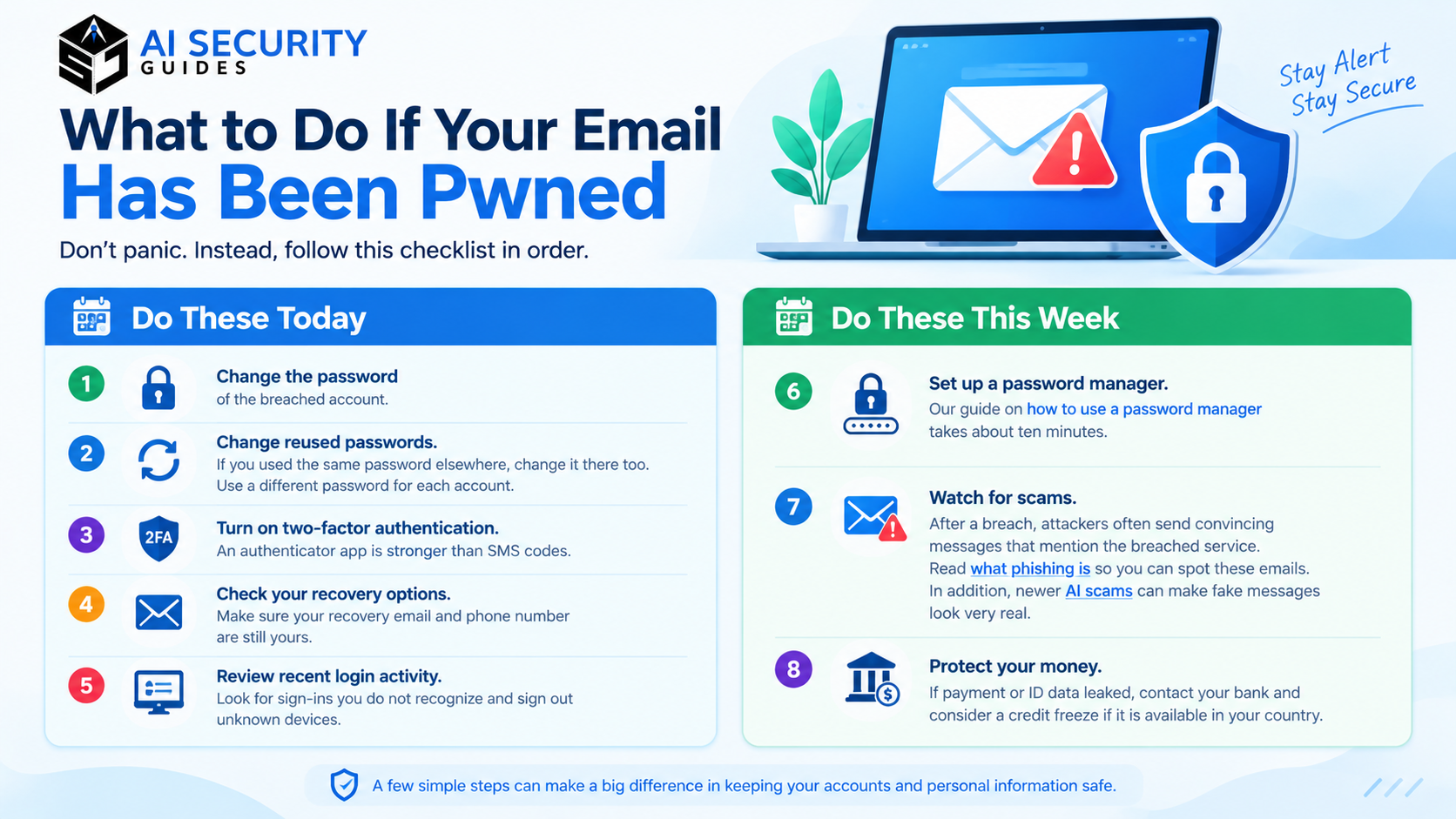
Don’t panic. Instead, follow this checklist in order.
Do these today:
- Change the password of the breached account.
- Change reused passwords. If you used the same password elsewhere, change it there too. Use a different password for each account.
- Turn on two-factor authentication. An authenticator app is stronger than SMS codes.
- Check your recovery options. Make sure your recovery email and phone number are still yours.
- Review recent login activity. Look for sign-ins you do not recognize and sign out unknown devices.
Do these this week:
- Set up a password manager. Our guide on how to use a password manager takes about ten minutes.
- Watch for scams. After a breach, attackers often send convincing messages that mention the breached service. Read what phishing is so you can spot these emails. In addition, newer AI scams can make fake messages look very real.
- Protect your money. If payment or ID data leaked, contact your bank and consider a credit freeze if it is available in your country.
Running a business? A breached work email can open the door to company systems. Therefore, review our small business cybersecurity checklist as well.
How to Check If Your Phone Number or Personal Information Was Leaked
Many people search for a data leak check for phone numbers. Unfortunately, this is harder than checking an email. Have I Been Pwned is built mainly around email addresses, so it does not work as a general phone number lookup. Please verify this on the site before you publish or rely on it, because features can change.
So what can you do instead?
- Read breach notices. Companies must often warn customers after a breach. Check your inbox and spam folder for these messages.
- Watch for warning signs. Sudden spam calls, strange SMS messages, or password reset codes you did not request can point to exposed contact details.
- Search for yourself. Use Google’s “Results about you” tool to find and request removal of your phone number and home address from search results.
- Limit what you share. Fewer accounts means fewer places for your data to leak. Our guide on how to protect personal information online explains this in detail.
To check if your personal information has been compromised online more broadly, combine all of these methods. No single tool covers everything. Also, be careful about what you type into AI chatbots, because that data can also end up stored. See 10 things you should never share with an AI chatbot and how to remove personal data from AI tools.
What If Your Email Is Not Found in a Data Breach?
Good news, but do not relax completely. A clean result only means your email is not in the breaches the tool knows about. In other words, new breaches happen all the time, and some never become public.
Therefore, keep these habits:
- Re-check every few months.
- Keep breach alerts turned on.
- Use unique passwords and 2FA on important accounts.
Frequently Asked Questions
Can I check if my email was leaked for free?
Yes. Have I Been Pwned and Mozilla Monitor are free. Both let you search or monitor an email address without paying.
Is Have I Been Pwned safe?
Yes, when you use the official site. It only asks for an email address, never your email password.
What should I do if my email has been pwned?
Change the affected password, change reused passwords, enable 2FA, and watch for phishing messages.
Can someone hack me with only my email address?
Not directly. However, an email address lets attackers send phishing messages and try leaked passwords on other sites. Strong, unique passwords and 2FA block most of these attempts.
What is a data breach database or data breach list?
It is a collection of information about known breaches. HIBP publishes a public list showing each breach, its date, and the data types exposed.
How often should I check my email for breaches?
Check every few months, and turn on alerts so you are told automatically.
How do I check if my phone number was leaked?
There is no single reliable tool. Use breach notices, watch for scam calls and texts, and limit where you share your number.
Final Thoughts
Now you know how to check whether your email appeared in a data breach, how to read the results, and how to respond. Remember, the check is quick, but the follow-up is what protects you. So run the search today, fix any exposed accounts, and turn on alerts.
For your next step, work through our AI safety checklist and our AI security for beginners guide.