

An AI safety checklist gives you a moment to pause before a useful shortcut becomes an avoidable problem. Imagine Alex, a fictional customer-support worker, preparing a reply about a delayed delivery. He opens a chatbot and starts copying the customer’s email, including an attachment.
Then he notices the attachment contains a home address and account reference. The tool also offers to connect his inbox. All he wanted was help writing three polite paragraphs.
In this hypothetical situation, Alex can still use AI. He just needs to share less, limit access and review the result before sending it.
This guide follows that same everyday workflow: choosing a tool, preparing a prompt, checking the answer and finishing safely. The twelve checks apply to common personal and workplace tasks, although available settings and organisational rules differ.
Table of Contents
- Start Your AI Safety Checklist With a Clear Task
- Check the AI Website or App Before Signing In
- AI Safety Checklist: Protect Your Account
- Review AI Privacy Settings Before Sharing Information
- Keep Sensitive Data Out of Your AI Prompts
- Inspect Files and Screenshots Before Uploading
- Add Connected-App Permissions to Your AI Safety Checklist
- Watch for Hidden Instructions and Suspicious AI Requests
- Verify Important Claims Before Trusting an AI Answer
- Review AI Content Before Sending or Publishing
- Keep Control When AI Can Take Actions
- Finish Your AI Safety Checklist With Cleanup and Recovery
1. Start Your AI Safety Checklist With a Clear Task
Before opening a tool, write down what you want it to do. “Draft a reply using these facts” sets a clearer boundary than “handle this customer.”
Match the review to the risk
Suggesting names for a fictional character is different from sending an email, changing a spreadsheet or recommending a consequential decision.
Ask what could happen if the output is wrong. If the answer involves private information, money, important records or someone’s reputation, plan a closer review.
Decide who will take the final action
Keep drafting and acting separate unless you have deliberately authorised both. Alex decides the chatbot may suggest wording, but he will check and send the message.
Make this your starting question: “What help do I need, and what control should I keep?”
2. Check the AI Website or App Before Signing In
A familiar-looking logo is not enough to establish that you have reached the intended service.
Use a known address or the provider’s official website to find its app. Check the domain carefully before entering credentials, uploading documents or paying.
Question unexpected requests
Pause if a simple writing tool asks you to install unrelated software, disable protection or grant broad device access.
A padlock in the browser indicates an encrypted connection; it does not establish that the business or its claims are trustworthy.
Keep your browser, device and applications updated. Avoid signing in through unexpected messages offering urgent upgrades or account recovery.
For a new service, identify the operator and locate its privacy information and support contact. If those basics are unclear, resolve them before sharing anything private.
3. AI Safety Checklist: Protect Your Account
Your AI safety checklist should include the account itself, not only the prompts you send.
Use a strong, unique password stored in a password manager. Enable multifactor authentication where available: an additional check beyond the password.
CISA’s online safety guidance highlights strong passwords, password managers, MFA, software updates and recognising phishing as basic protective measures. CISA
Review access and recovery
Check available session controls and sign out of devices you no longer use. Protect the email account used for password recovery, too.
Do not approve an unexpected authentication request or paste recovery codes into a chatbot.
On a shared computer, avoid saving credentials and sign out when finished. Account protection matters even when your current conversation contains nothing sensitive: older chats and connected services may deserve protection as well.
4. Review AI Privacy Settings Before Sharing Information
History, memory and model training are separate concepts:
- History is the record of your conversations.
- Memory is information used to personalise future responses.
- Training is a process used to improve models.
The controls available depend on the service, account and workplace setup.
Check what each switch actually changes
OpenAI’s ChatGPT data-controls guidanceTemplates says turning off “Improve the model for everyone” prevents new conversations from being used for training. It does not delete saved chats.
The same guidance says temporary chats may be retained for up to 30 days for safety purposes. Temporary should therefore not be understood as “nothing is ever stored.” OpenAI Help Center
Check workplace requirements
Before using company information, confirm that the tool and task are approved. A paid subscription does not establish that every upload is permitted.
Privacy settings can reduce some uses of your information. They do not make unnecessary disclosure a good idea.
5. Keep Sensitive Data Out of Your AI Prompts
Use your AI safety checklist to ask whether each detail actually helps the task.
Leave out passwords, verification codes, payment identifiers, identity documents and unnecessary personal records. Consider other people’s information as carefully as your own.
For a fuller reference, read 10 things you should never share with an AI chatbot.
Replace identifiers with clear placeholders
Here is Alex’s hypothetical prompt before and after review.
Before:
Read this complete customer email and attachment, then write a reply.
Safer version:
Draft a polite reply about a delayed delivery. Explain that we are checking the shipment and will provide an update when confirmed. Use [Customer] and [Order reference]. Do not promise a refund or delivery date.
Check your authority to share
Being able to access a record does not automatically mean you may upload it elsewhere.
Australia’s OAIC guidance on commercial AI products addresses organisations’ privacy responsibilities when using personal information with AI. Workplace obligations require more than a quick settings change. OAIC
6. Inspect Files and Screenshots Before Uploading
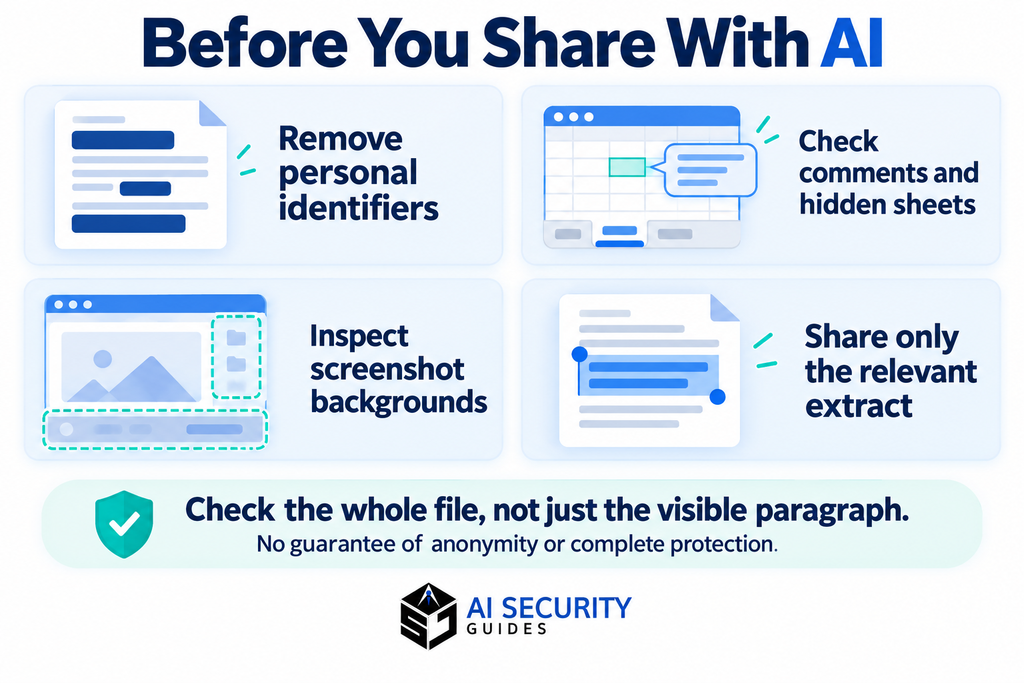
The paragraph you want help with may be only a small part of what the file contains.
Inspect document comments, tracked changes, extra spreadsheet columns, hidden sheets and screenshot notifications. Check photos for visible addresses or badges and relevant metadata where applicable.
Share an extract when possible
For a CV edit, provide the relevant experience section rather than contact details and references.
For a document summary, use only the authorised pages needed for the question. Alex replaces the customer attachment with a short issue summary.
Check the cleaned copy
Save a separate version and reopen it before uploading. Use proper redaction when information must be removed; a coloured box over text may leave the underlying content accessible.
Removing a name does not guarantee anonymity. A unique job title, location or incident could still identify someone.
7. Add Connected-App Permissions to Your AI Safety Checklist
Connecting an inbox or cloud drive can provide access beyond the information you intended to discuss.
Read the permission screen before accepting. Distinguish reading content from editing, sending or deleting it.
Match access to the task
Ask whether the task needs a connection at all. A short, cleaned extract may be enough.
Where the service supports it, limit access to relevant resources. Do not assume every connector offers granular controls.
Alex decides his reply draft does not need inbox access. He supplies the necessary facts manually instead.
Review connections periodically and remove those you no longer need. Check both the AI tool and the connected service for relevant controls.
Disconnecting an app addresses ongoing access; it should not be treated as confirmation that information already transferred has been deleted.

8. Watch for Hidden Instructions and Suspicious AI Requests
An AI assistant may read text from documents, emails or websites. That outside material can contain instructions attempting to redirect its behaviour.
This is called prompt injection. The UK’s NCSC explanation describes the difficulty of reliably separating instructions from untrusted content in these systems. National Cyber Security Centre
Notice changes in the task
Suppose a document being summarised tells the assistant to send information to an unfamiliar address. That instruction is part of the document, not permission from you.
Stop when an assistant unexpectedly requests secrets, proposes unrelated actions or introduces a new destination for private information.
Do not rely on spotting every attack
Suspicious instructions may be hard to see. Limit permissions and review consequential actions rather than assuming careful reading will catch everything.
Treat outside content as material to examine, not as an authority to control your accounts.
9. Verify Important Claims Before Trusting an AI Answer
An AI safety checklist needs an accuracy check as well as privacy controls.
AI can produce confident statements that are false or unsupported. NIST’s Generative AI Profile identifies this risk, including fabricated supporting citations. nvlpubs.nist.gov
Follow important claims to evidence
Open original sources. Check the relevant passage, date, figures and conditions. A working link does not prove that the linked page supports the claim.
Recalculate important totals and percentages independently.
Match the answer to your circumstances
Check country, product version, account type and eligibility conditions. Guidance intended for the US may not apply in the UK or Australia.
For health, legal or financial matters, use relevant authoritative information and seek qualified advice where needed.
Ask the tool to flag uncertainty, but do not treat its confidence score or a second chatbot’s agreement as independent proof.
10. Review AI Content Before Sending or Publishing
Read the finished output as something you are responsible for using.
Check names, dates, tone and promises. Compare summaries with the original material to find missing qualifications.
Look for assumptions and unfair treatment
Does the draft invent someone’s motives or judge them based on a personal characteristic rather than relevant facts? Remove unsupported assumptions and check whether the wording treats people fairly.
Alex spots a refund promise in the suggested reply. He removes it because the company has not authorised that commitment.
Before using someone else’s words, image or voice, check permission, applicable terms and your organisation’s rules. Do not imply a real person said or endorsed something they did not.
Verify unusual requests separately
AI-generated impersonation can also appear in messages you receive. The FTC’s voice-cloning scam guidance recommends contacting the supposed caller using a number you already know. Consumer Advice
Do not rely on a familiar-sounding voice to approve an unusual payment or disclosure.
11. Keep Control When AI Can Take Actions
The moment an assistant can send, edit or delete, the consequences extend beyond an inaccurate paragraph.
Before approving an action, check the actual recipient, file, account, amount or destination. Read the final content and any attachments.
Use bounded tasks and review points
Prefer a clearly defined action with an understandable result. Avoid giving broad permission to “sort everything out” when the tool could affect important records.
For changes that can damage work, consider a backup, preview or safe test using copies. Understand how you would stop or undo the action.
Use required workplace approvals. If you are not authorised to perform an action yourself, do not assume asking AI makes it acceptable.
Alex checks the recipient and revised wording, then sends the reply himself. The assistant helped with drafting while the final decision remained clear.
12. Finish Your AI Safety Checklist With Cleanup and Recovery
After the task, review what remains: unnecessary uploads, saved conversations, shared links and unused connections.
Where relevant, inspect memory and personalisation separately. Check the provider’s retention and deletion guidance rather than assuming one delete button reverses every disclosure.
Respond to the information involved
| What happened | Practical next step |
|---|---|
| A password or access token was shared | Change or revoke the exposed credential |
| A private file was uploaded | Review file, chat and relevant memory controls |
| Workplace information was disclosed | Follow your organisation’s incident process |
| An incorrect message was sent | Correct it through the appropriate channel |
| An unfamiliar app gained access | Review permissions, revoke access and check activity |
For detailed cleanup steps, see how to remove personal data from AI tools.
A quick check before you finish
- Did I use the intended tool and protect the account?
- Did I minimise information and inspect attachments?
- Did I review settings and permissions?
- Did I verify important claims and final actions?
- Do I know what remains stored and what to do if something went wrong?

Frequently Asked Questions
What is an AI safety checklist?
It is a repeatable set of checks for the tool, information, permissions, output and actions involved in an AI task. It helps you notice avoidable risks before and after using the service.
Is turning off model training enough?
No. Training controls do not address every issue, including account access, stored conversations, connected apps and incorrect answers. Review the settings relevant to your task.
Are paid AI tools automatically safer?
Price alone does not establish suitability. Examine the service’s controls, terms, data handling and organisational approval. Different account types can offer different protections, but they still need appropriate use.
Can I use AI safely for work?
Use your employer’s approved tools and follow its information-sharing and review rules. If approval is unclear, ask the responsible team before uploading company or customer records.
What if I have already shared something private?
Respond according to the information involved. Secure exposed credentials immediately, follow workplace reporting requirements where relevant and review available deletion controls. Avoid creating more copies while seeking help.
Make the routine easy to repeat
Alex completes the customer reply without uploading the full attachment, connecting his inbox or accepting an invented promise. The checks support the task rather than replacing it.
Keep this AI safety checklist beside the tools you use regularly. For more everyday guidance, explore AI security for beginners.
This guide is educational. Controls and policies vary, and no checklist guarantees complete safety.