

What is phishing, and how can you spot it when a message arrives at exactly the moment you expect it?
Hypothetical example: Alex is waiting for a package when a text arrives saying delivery has failed. It asks for a small payment to arrange another attempt. The timing makes sense, the logo looks familiar, and Alex almost opens the link.
Then a question interrupts the rush: why would the delivery company need payment through this message?
That pause is where this guide begins. You will learn how deceptive messages work, which warning signs deserve attention, and how to verify a request without following the sender’s instructions. You will also find different recovery steps for clicking a link, sharing a password, downloading a file, or sending money, plus reporting guidance for the UK, US, and Australia.
Table of contents
- What Is Phishing? The Trick Behind a Believable Message
- How a Phishing Message Can Become a Bigger Problem
- Types of Phishing: Email Is Only the Beginning
- How to Spot Phishing Before Urgency Takes Over
- How AI Can Make Phishing Messages More Convincing
- A Message Looks Suspicious: Check It Safely
- Three Everyday Scenarios and the Safer Response
- How to Prevent Phishing From Becoming an Account Takeover
- Clicked a Phishing Link? Match Your Response to What Happened
- Reporting Routes in the UK, US, and Australia
- Frequently Asked Questions
- Before You Respond: Your Final Safety Check
1. What Is Phishing? The Trick Behind a Believable Message
Phishing is an attempt to trick you into revealing information, transferring money, or taking an unsafe action by pretending to be someone trustworthy. The approach might arrive through email, text, phone, social media, or a website.
It is a form of social engineering: manipulating a person’s decisions rather than relying only on a technical weakness. Australia’s official phishing guidance describes how criminals impersonate trusted organizations to obtain information. CGA
A familiar logo does not prove who sent a message. Neither does knowing your name. Someone may copy branding or use publicly available details to make a request feel personal.
The target could be your login credentials, card details, identity documents, or workplace access. Credential theft means stealing the information used to sign in. That access can allow further fraud, including messages sent from your account.
2. How a Phishing Message Can Become a Bigger Problem
An attack often starts with a believable reason to act: a missed delivery, an account warning, or an invoice. Next comes pressure to resolve the issue immediately.
The requested action creates the danger. A link may open an imitation login page; an attachment may contain malware, meaning harmful software. Some attacks lead to ransomware, which can lock files and demand payment. Microsoft Support
Other scams require no download. A convincing payment request can persuade someone to send money directly. Business email compromise, or BEC, involves deceptive business communications designed to obtain money or valuable information.
Do not judge the risk only by how much money the first message requests. A small payment form could also collect card details. Ask what information or access the action would give away.
3. Types of Phishing: Email Is Only the Beginning
The names describe either the communication channel or the target. You do not need to memorize them to respond safely, but recognizing the differences helps explain why attacks look different.
| Type | What it looks like |
|---|---|
| Bulk email phishing | A broadly distributed fake account warning or offer. |
| Spear phishing | A tailored message aimed at a particular person or organization. |
| Whaling | Targeted phishing directed at senior executives or other high-value individuals. |
| Business email compromise | An impersonated or compromised business account requesting payments or information. |
| Smishing | A phishing attempt delivered through text messages. |
| Vishing | Voice calls that use impersonation to obtain information or money. |
| Social media phishing | Deceptive direct messages, account alerts, or support requests. |
| Quishing | A QR code directing you toward a deceptive destination. |
Clone phishing copies a legitimate-looking message while replacing a link or attachment. CEO fraud impersonates an executive; email account compromise involves an attacker gaining control of an actual account. These techniques can overlap.
A QR code is simply another way to open a destination. The FTC’s QR-code warning explains that codes can lead to imitation websites. Scanning is not a reason to trust what appears next. Consumer Advice
4. How to Spot Phishing Before Urgency Takes Over
Alex rereads the delivery text. Instead of focusing on the fee, Alex checks the request: unexpected payment, an unfamiliar address, and pressure to act quickly.
No single warning sign catches every attack. Look at the request, the sender, and the destination together.
Pressure and unusual requests
Be cautious when someone demands secrecy, immediate payment, or a verification code. An instruction to ignore your usual approval process deserves independent checking, even when it appears to come from your manager.
Poor spelling can be a clue, but polished writing is not evidence of legitimacy. Similarly, a message using your name can still be fraudulent.
Addresses, attachments, and payment changes
Expand the sender details instead of trusting the display name. Watch for look-alike spelling, unexpected domains, and attachments you were not expecting.
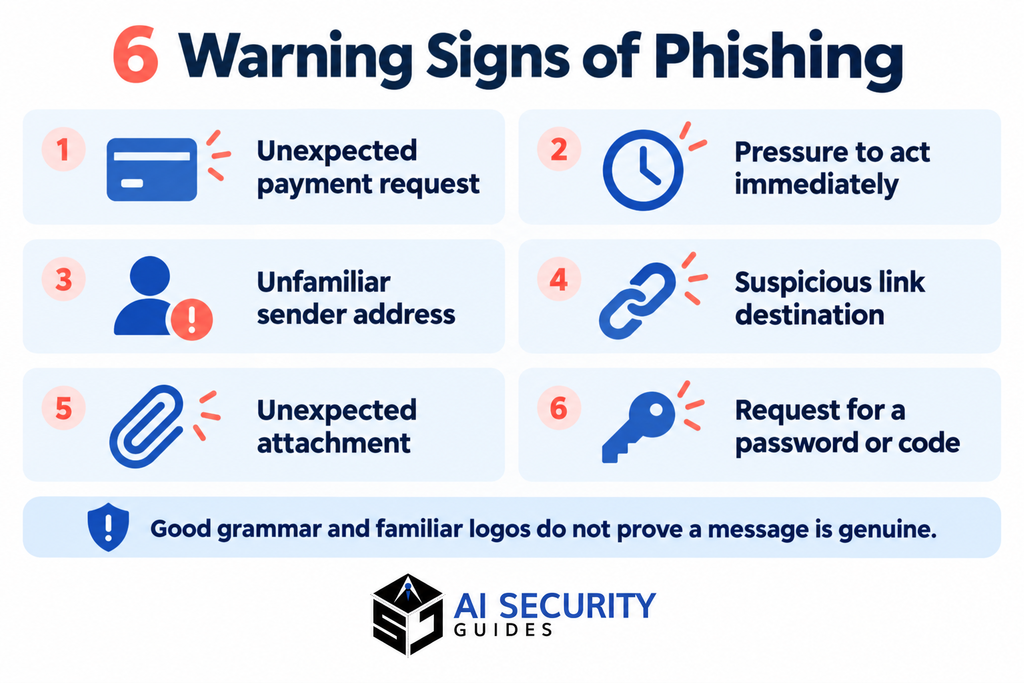
Microsoft’s phishing guidance highlights mismatched domains and suspicious links. A genuine-looking email address still does not prove that an unusual request is authorized: the account itself may be compromised. Microsoft Support
5. How AI Can Make Phishing Messages More Convincing
AI-generated phishing emails can use fluent language and tailored details. Voice-generation tools can also help impersonate someone familiar. The FBI’s warning about generative AI fraud describes criminals using generated text, images, and audio to strengthen deceptive approaches. ic3.gov
This changes what you should rely on. Grammar checks and a familiar-sounding voice cannot establish who is contacting you.
You do not need to decide whether AI wrote a message. Verify whether the request is real through a separate, trusted route. A callback to a number you already know is more useful than guessing from writing style.
For wider precautions around chatbots and uploads, read our AI security guide for beginners.
6. A Message Looks Suspicious: Check It Safely
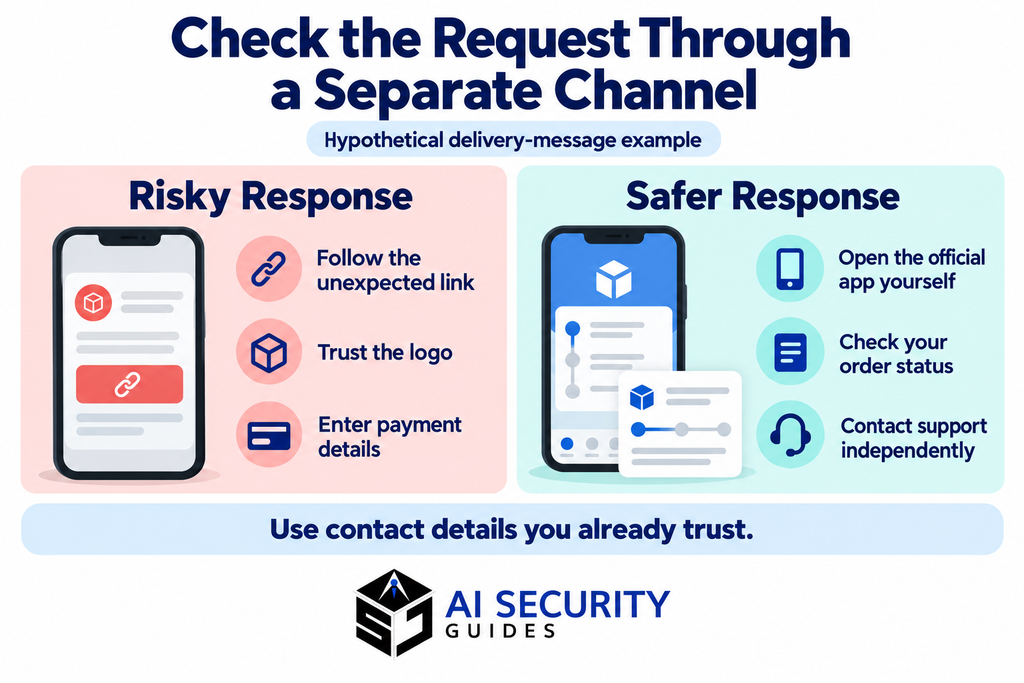
Close the message and open the organization’s official app, an existing bookmark, or a website address you already know. Check whether the claimed problem appears there.
If necessary, contact support through that independent channel. Do not use the telephone number supplied in the suspicious message to verify the same message. The FTC recommends contacting organizations using details you know are genuine. Consumer Advice
On a desktop, hovering over a link may reveal its destination without opening it. For QR codes, inspect the destination shown by your scanner before proceeding. If the address is shortened, confusing, or unfamiliar, use the official app instead.
Avoid clicking merely to investigate. Do not reply, download an attachment, or use an unsubscribe link in an apparent scam.
Also avoid pasting complete private emails, password-reset links, or confidential documents into public checking tools. Our guide to information you should never share with an AI chatbot explains what to remove before seeking AI assistance.
7. Three Everyday Scenarios and the Safer Response
These hypothetical examples show how verification fits everyday situations. The useful habit is to step outside the message before doing what it asks.
The delivery fee
Hypothetical example: Alex opens the retailer’s order page directly and checks the carrier’s official tracking service. There is no request for another payment. Alex reports the text instead of submitting card details.
The important change is the source of instructions: independently accessed account information replaces the unexpected message.
The bank security alert
Hypothetical example: A caller says suspicious activity requires moving savings into a temporary account. The recipient ends the call and contacts the bank using the number on their card.
An alarming story does not make the caller’s payment instructions trustworthy. Verification should happen before any transfer.
The urgent supplier invoice
Hypothetical example: An employee receives a familiar invoice with new payment details. They call the supplier using an established contact number and follow the company’s approval process before changing anything.
The invoice format may be genuine while the banking instructions are not. Check the change itself, not just the document’s appearance.
8. How to Prevent Phishing From Becoming an Account Takeover
Good checking habits work best alongside account protection. Unique passwords reduce the damage if one password is exposed; a password manager helps you maintain them.
Use multifactor authentication, or MFA, wherever available. It adds a sign-in requirement beyond a password. Prefer phishing-resistant options such as supported passkeys or security keys. CISA recommends phishing-resistant MFA rather than treating all methods as equally protective. CISA
Keep your browser, operating system, and security software updated. Enable automatic updates where practical. Filters can catch some threats, but an email reaching your inbox is not a safety certificate. Microsoft Support
At work, require independent verification for changed payment details. Give employees an easy reporting route and avoid blaming people who raise concerns. Security awareness training should teach what to do after a mistake, too.
9. Clicked a Phishing Link? Match Your Response to What Happened
Stop interacting with the message or website. Write down what you clicked, entered, downloaded, or approved. Those details help you choose the next step without assuming every incident has the same consequences.
Australia’s scam recovery guidance emphasizes that the response depends on the information shared. If money is involved, contacting your financial provider is urgent. CGA
| What happened | Immediate response |
|---|---|
| Opened a page but entered nothing | Close it. Check for downloads, permission changes, and security alerts. |
| Entered a password or code | Use the official service from a trusted device to secure the account immediately. |
| Downloaded or opened a file | Stop using the file; run trusted security checks and seek support if it executed. |
| Sent money or exposed payment details | Contact the bank or payment provider through an official channel immediately. |
| Used a work account or device | Notify your IT or security team promptly and follow its instructions. |

After sharing a password or code
Change the affected password and any reused copies. Review recovery details, active sessions, connected apps, and unfamiliar activity. Use the service’s option to sign out other sessions where available.
For email accounts, also check forwarding rules. If you cannot sign in, start the provider’s official account-recovery process. A password change alone may not remove every form of access.
After opening a file or sending money
If you ran suspicious software or granted remote access, disconnect the affected device from the network and seek trusted support. Use another trusted device for account recovery. On a managed work device, contact IT immediately; avoid wiping potential evidence yourself. Cyber.gov.au
Ask your payment provider whether it can stop or recall the transaction. Recovery is not guaranteed. Be cautious of strangers promising to recover money for an upfront fee. CGA
10. Reporting Routes in the UK, US, and Australia
Report through your email or messaging app’s built-in controls where available. Keep relevant screenshots, dates, sender details, and transaction references. Do not reopen attachments just to collect evidence.
Reporting a suspicious message is different from recovering an account or reporting financial loss. You may need more than one route.
- UK: Forward suspicious emails to report@phishing.gov.uk through the NCSC’s reporting process. Forward suspicious texts to 7726, following the NCSC’s text-reporting guidance. National Cyber Security Centre
- US: Report scams through ReportFraud.ftc.gov. For financial cybercrime, you can also file with the FBI’s Internet Crime Complaint Center. Consumer Advice
- Australia: Report scam attempts to Scamwatch. If you lost money or shared personal information, use the reporting route linked in Cyber.gov.au’s recovery guidance to report cybercrime through ReportCyber. Scamwatch
Contact your bank first when a payment may still be stopped. For workplace incidents, follow internal reporting procedures as well.
11. Frequently Asked Questions
1. What are 7 signs of phishing?
An unfamiliar sender, urgent demands, suspicious links, unexpected attachments, requests for sensitive information, unusual wording, and offers that seem too good to be true.
2. What is phishing in simple terms?
Phishing is a scam where someone pretends to be a trusted person or organisation to steal your information, money, or account access.
3. What are four types of phishing attacks?
Email phishing, spear phishing (targeted messages), smishing (text messages), and vishing (phone calls).
4. What are the top 3 best practices for avoiding phishing attacks?
Verify unexpected requests through a trusted channel, avoid suspicious links and attachments, and never share passwords or verification codes.
5. How do you avoid phishing?
Open official websites or apps directly instead of following unexpected links. Check requests carefully and report suspicious messages.
6. What is the most common method used in phishing attacks?
Email is commonly used: scammers impersonate trusted organisations and ask you to click a link, open an attachment, or share sensitive information.
12. Before You Respond: Your Final Safety Check
Alex avoided the payment request by checking independently. You can apply the same pause to a bank alert, a workplace invoice, or a message from a familiar account.

Before responding, ask:
- Was I expecting this request?
- Am I being pushed to act before checking?
- Does it ask for money, credentials, or unusual access?
- Can I verify it through an official app or known contact?
- If I already acted, have I secured the affected account and reported it?
Knowing the answer to “what is phishing?” is useful when it changes your next decision. Pause before clicking, verify before paying, and seek help promptly after a mistake.
Explore our everyday AI safety checklist for related habits when using AI tools and connected apps.