


What Does a VPN Protect? A Beginner’s Guide to Its Real Limits
What does a VPN protect, and what does it leave wide open? Take Maya, a hypothetical traveler sitting in an airport lounge. She opens her laptop and taps the free Wi-Fi network, and a pop-up warns her that the connection is not private. She remembers a friend saying, “Just use a VPN,” so she turns one on and relaxes.
That question matters because VPN ads often promise more than the technology can deliver. A virtual private network, or VPN, is a tool that sends your internet traffic through an encrypted connection to a server run by the VPN provider. It can hide your traffic from other people on the same network. It can also mask your real IP address from the websites you visit. However, it cannot make you anonymous, stop a phishing email, or clean up malware that already sits on your device.
In this guide, you will find a straight answer to the question, what does a VPN protect in everyday life? You will also see where that protection ends and what to check before you trust a provider. Along the way, you will learn how two popular services, NordVPN and Proton VPN, handle these jobs. Finally, you will get a simple checklist you can follow today, plus links to other guides on this site that cover the gaps a VPN leaves behind.
Table of Contents
- The short answer
- How a VPN works
- Public Wi-Fi
- Internet provider and websites
- Limits: what a VPN cannot cover
- Your phone
- When your VPN disconnects or gets blocked
- NordVPN and Proton VPN
- Real-world scenarios
- Do you need a VPN?
- How to choose a VPN
- Daily routine checklist
- Frequently asked questions
- Conclusion
What Does a VPN Protect? The Short Answer
So, what does a VPN protect? In short, a VPN protects the path your data travels between your device and the VPN server. It scrambles that traffic, which is called encryption, so people on your Wi-Fi network or at your internet provider cannot read it easily. It also swaps your real IP address for the VPN server’s address. As a result, the websites you visit see the server’s location instead of your own.
That is a useful job, but it is a narrow one. A VPN protects the connection. It does not protect the device, the account, or the choices you make once you are online. Therefore, the best way to think about it is as one layer in a larger routine, not a complete shield.
Quick reference: what does a VPN protect at a glance
Here is the quick version. Read the table once, then keep reading for the details behind each row.
| Threat | Does a VPN help? | Why |
|---|---|---|
| Someone snooping on public Wi-Fi | Yes | It encrypts traffic between your device and the VPN server |
| Your internet provider watching your browsing | Mostly | It hides the sites and pages you visit, but the VPN company can see more |
| Websites seeing your real IP address | Yes | They see the VPN server’s address instead |
| Phishing emails and texts | No | The message still arrives, and the trap still works |
| Malware downloads | Not by itself | A basic VPN does not scan or remove files |
| Weak or reused passwords | No | Account security depends on your credentials |
| Cookie and login tracking | Limited | Sites still recognize you when you sign in |
| Data breaches at companies | No | Your data sits on their servers, not in your tunnel |
Notice the pattern. A VPN covers the network layer. Most modern scams and hacks, however, target people and accounts instead. That gap explains why so many VPN users still get hacked, scammed, or tracked.

How a VPN Works in Plain English
Before you can judge what does a VPN protect, it helps to see how one works. Picture two ways of sending a message. A normal connection works like a postcard: anyone who handles it along the way can read it. A VPN connection works like a sealed, tamper-resistant envelope inside a courier van. People can see the van, but they cannot read the letter.
The encrypted tunnel
When you start a VPN app, it creates an encrypted connection between your device and a VPN server. Security experts often call that connection a tunnel. Your apps and browser send their requests into the tunnel, and the VPN server forwards them to the websites you want. The websites reply to the server, and the server sends the answer back to you through the same tunnel.
The scrambling relies on encryption standards that modern VPN apps use by default. For example, many providers use strong ciphers such as AES-256 or ChaCha20, depending on the protocol you choose. You do not need to memorize those names. Instead, remember the practical result: anyone who captures the traffic between you and the server sees unreadable data. When people ask what does a VPN protect, this encrypted trip is the core of the answer.
What a VPN protects through your IP address
Your IP address works like a mailing address for your internet connection. Every website you visit sees it, and it can reveal your approximate city and your internet provider. When you connect to a VPN, websites see the server’s IP address instead. Consequently, a site can no longer use your home address to guess where you are.
This protection has limits. If you log in to your email, your social media account, or your bank, the site knows who you are no matter which IP address you use. In addition, your browser shares details such as screen size, language, and installed fonts. Sites can combine those details into a fingerprint. A VPN hides the address, but it does not erase the person behind it. So what does a VPN protect about your identity? Your address, not your accounts.
What your VPN provider can see
Here is the part ads rarely explain. A VPN does not remove trust from the equation. Instead, it moves trust from your internet provider to the VPN company. The provider sits in the middle of your traffic, so it can technically see which servers you contact. A trustworthy provider promises not to record that information. This promise is called a no-logs policy.
You cannot check a no-logs policy by reading the marketing page. That is why independent audits matter. An audit is a review by an outside firm that checks whether a company’s systems match its claims. Even so, an audit is a snapshot in time, not a permanent guarantee. The Federal Trade Commission has also urged people to research a VPN app, review its permissions, and check whether it shares data with third parties before installing it. That advice still holds today. Ask what does a VPN protect only after you decide the provider deserves your trust.
What Does a VPN Protect on Public Wi-Fi?
Public Wi-Fi is the classic reason people buy a VPN. Cafes, airports, hotels, and libraries all offer free networks. Maya’s airport lounge in our opening example is a typical case. So what does a VPN protect when you join one of those networks? Mainly, it protects the data that travels between your device and the VPN server while you use the shared connection.
Why public Wi-Fi feels risky
An open network, which asks for no password, does not encrypt the traffic between your device and the router. Anyone with the right tools in the same room may try to watch that traffic. Even a network with a password can be weaker than people think. Everyone in the cafe shares the same password, so the privacy between users depends on how the network is set up.
There is also the fake hotspot problem. An attacker can create a network named something like “Airport Free WiFi” and wait for people to connect. If you join it, the attacker controls the path your data takes. As a result, you may see strange pop-ups, redirected pages, or login requests that look slightly off.
How HTTPS changes the picture
Today, most websites use HTTPS, which encrypts the connection between your browser and the site. You can spot it by the padlock icon and the “https” at the start of the address. Because of HTTPS, a stranger on the same Wi-Fi network usually cannot read your banking session or your email password in plain text. The FTC has long told people to look for HTTPS on every page where they log in or share personal information.
That fact surprises many beginners. Public Wi-Fi is less dangerous than it was ten years ago, and a VPN is no longer the only defense. Nevertheless, HTTPS has gaps. Some older apps do not encrypt everything, and some sites mix secure and insecure pages. A VPN fills those gaps because it encrypts the whole connection, not just the websites that support HTTPS. Beyond HTTPS, what does a VPN protect? Mostly metadata, such as which sites you visit.
Safe habits to pair with what a VPN protects
A VPN works best when you also follow a few simple habits on shared networks. First, confirm the network name with the staff before you join, because fake hotspots copy real names. Next, turn off automatic Wi-Fi joining so your phone does not connect to look-alike networks. In addition, keep file sharing off and let your firewall run. Finally, log out of sensitive accounts when you finish.
These habits cost nothing, and they cover problems a tunnel cannot solve. For example, a VPN will not tell you that you joined the wrong network. It will encrypt your traffic on that network just the same. So when someone asks what does a VPN protect on a hotspot, the honest answer includes a reminder to check the hotspot first.
Fake hotspots and when a VPN still helps
A VPN adds value on public networks in several specific ways. First, it hides which sites you visit from the network owner. Second, it protects traffic from apps that do not use encryption well. Third, it reduces what a hotel or cafe can log about your activity. In other words, what does a VPN protect on public Wi-Fi? It protects your privacy from the network itself.
However, a VPN will not fix a fake hotspot if you hand your password to a fake login page. If you type credentials into a page that an attacker controls, the tunnel does not matter. The fake page still receives them. Therefore, treat unusual login screens and certificate warnings seriously, even when your VPN is on. Pair the VPN with the basics: update your device, log out when finished, and avoid sensitive tasks on networks you cannot verify.

What Does a VPN Protect From Your Internet Provider and Websites?
Your internet service provider, or ISP, is the company that sells you home internet or mobile data. Because all your traffic passes through its network, the ISP sits in a powerful position. So what does a VPN protect when you want some privacy from that company? The answer is more nuanced than most ads suggest.
What a VPN protects from your ISP
Without a VPN, your ISP can see the domain names of the sites you visit. It can also see when you connect, how much data you use, and which apps generate the most traffic. With a VPN on, your ISP mostly sees one thing: an encrypted connection to a VPN server. The sites and pages inside that connection stay hidden from it. In plain terms, what does a VPN protect from your ISP? The list of places you visit.
The ISP still sees that you use a VPN, and it can still measure how much data you send. In addition, your ISP’s privacy policy explains what it collects and how it uses that data. Read it before you decide whether a VPN is worth the monthly cost. If you value privacy from your ISP, a VPN is a reasonable tool. However, you must trust the VPN provider more than you trust the ISP, so choose carefully.
Websites, ads, and your IP address
Websites and advertisers also try to learn about you. A VPN gives them a different IP address, which makes it harder to tie your visits to your home connection. It also helps you avoid simple location-based targeting, such as prices or ads based on your city. For example, a shopping site may show different results when it thinks you are in another state.
Nevertheless, advertisers have many other ways to recognize you. They use cookies, which are small files that sites store in your browser. They use login data, device identifiers, and browser fingerprints too. As a result, what does a VPN protect against ad tracking? Only the IP-address part. You will need browser privacy settings and careful logins to cover the rest.
What does a VPN protect when you travel?
Travel is where VPNs often prove their worth. Hotel networks, airport portals, and shared apartment Wi-Fi all benefit from encryption. A VPN can also help you reach your home services when you are abroad, such as your streaming accounts or work tools. Some people use it to avoid local network restrictions.
Rules vary by country, though. Some governments restrict or ban VPN use, and some online services block traffic from known VPN servers. Before you travel, check the local laws and the terms of the services you plan to use. Abroad, what does a VPN protect? Your connection, but it cannot change local laws or service rules. In addition, install and test your VPN at home first. Troubleshooting a blocked connection from a hotel room is a frustrating way to learn how the app works.
What a VPN Cannot Protect
This is the section the ads skip. A VPN is a privacy tool for your connection, so it ignores most of the ways people actually lose money or accounts. Understanding these limits is the difference between feeling safe and being safe. Each risk below also links to a guide with practical next steps. If you remember only one answer to what does a VPN protect, remember that it covers the road and not the traveler.
What a VPN cannot protect against phishing
Phishing is a scam where an attacker sends a message that looks real, such as a bank alert or a delivery notice, to trick you into sharing a password or clicking a bad link. A VPN does nothing to stop that message from reaching your inbox. It also does not warn you when a link points to a fake page. The tunnel simply carries your click to the scam site, safely encrypted.
Phishing keeps getting better because attackers now use AI tools to write polished messages. Our guide on what phishing is and how to spot it explains the warning signs step by step. In addition, our overview of AI scams and how to verify them shows how voice clones and fake messages work. So, what does a VPN protect against scammers? Very little. Your habits matter far more.
What a VPN cannot protect against malware
Malware is software built to harm your device or steal your data. Examples include spyware, banking trojans, and ransomware. If you download an infected file while your VPN is on, the file still installs and still runs. The VPN encrypted the download, but it did not inspect it.
Some VPN products add extra tools to fill that gap. For instance, NordVPN says its Threat Protection Pro feature blocks malicious websites, limits trackers, and scans downloads for malware. Those features come on top of the VPN itself, and they do not replace a full security setup. Keep your system updated, install software only from trusted sources, and read our guide on the common signs of malware. If a scan flags something, our article on how to read an antivirus scan result helps you respond calmly. So what does a VPN protect when you download a risky file? Nothing about the file itself.
What a VPN cannot protect against weak passwords
Imagine a thief who steals your password from a data leak and then logs in to your account from another country. Your VPN played no part in that theft, and it cannot block the login. Account security depends on strong, unique passwords and a second step, such as an authenticator app or a security key.
A password manager solves the hardest part of that job, because it creates and remembers a different password for every site. Our beginner’s guide to using a password manager shows you how to set one up in an afternoon. Turn on multi-factor authentication for your email, bank, and main social accounts as well. Those two steps will protect your accounts better than any VPN subscription. Again, what does a VPN protect when your password is weak? Not the account.
Tracking through cookies, logins, and fingerprints
Many people assume a VPN makes them invisible to trackers. It does not. When you sign in to a social network or a search engine, that company knows who you are, and it connects your activity to your account. Cookies persist between visits, so a site can recognize your browser even after your IP address changes.
Browser fingerprinting adds another layer. A fingerprint combines many small details, such as your screen size, time zone, and installed fonts, into a unique pattern. Therefore, what does a VPN protect against modern trackers? It hides your IP address, which is one signal among dozens. Use a privacy-focused browser, clear cookies regularly, and limit which accounts stay logged in.
Data breaches and what you share voluntarily
A data breach happens when attackers steal information from a company’s servers. Your VPN cannot stop that, because the company holds your data, not your device. The same logic applies to anything you post, upload, or type into a form. If you share your phone number with a store, a VPN does not stop the store from keeping it.
You can respond to breaches in practical ways. First, find out whether your email address appeared in one by following our six steps to check a data breach. Next, change any reused passwords. Finally, share less in the first place. Our guide on how to protect your personal information online covers that habit in detail. Ransomware is another example: if attackers lock your files, a VPN cannot unlock them, so see our ransomware prevention and recovery guide for a plan. After a breach, what does a VPN protect? Nothing, because the leak happens on the company’s servers.

What Does a VPN Protect on Your Phone?
Phones switch networks all day. They jump from home Wi-Fi to mobile data to a coffee shop network without asking. A VPN app on your phone can protect traffic across all of those connections. So what does a VPN protect on a phone? It encrypts the traffic that your apps and browser send, no matter which network carries it.
Can a VPN access your phone data?
Many beginners worry about this question, and the answer has two parts. First, a VPN app does not automatically read your photos, contacts, or messages. Phone operating systems limit what each app can reach, and a VPN app works through a system feature that routes network traffic. Second, the VPN provider can see network information that passes through its servers, such as which servers your apps contact. HTTPS still hides the content of secure pages from the provider. That split answers what does a VPN protect on a phone: the traffic, not the contents of the device.
The real risk comes from the app itself. A careless or malicious VPN app can ask for permissions it does not need, collect data, or share it with advertisers. The FTC has advised people to check whether a VPN app really encrypts traffic, what permissions it requests, and whether it shares information with third parties. Consequently, the question is not whether a VPN can access your phone data in theory. The question is whether you can trust this particular app.
Apps, permissions, and free VPN risks
A VPN also does not control what your other apps collect. Your weather app, your shopping app, and your social media apps still gather data they are allowed to gather. The VPN only changes the network path. To limit app tracking, review permissions in your phone settings and delete apps you no longer use.
Free VPN apps deserve extra caution. Running servers costs money, so a free service must earn income somehow, and sometimes that income comes from your data. Look for an app with a clear privacy policy, a short list of permissions, and independent audits. Avoid apps that appear from nowhere with thousands of suspiciously perfect reviews. When you compare apps, ask what does a VPN protect and what does this app collect in return? Later in this guide, you will see one example of a free plan from a provider that publishes audits.
What Happens When Your VPN Disconnects or Gets Blocked
A VPN only protects you while it is connected. That sounds obvious, but many people forget it. Connections drop when you switch networks, when your device wakes from sleep, or when the VPN server has a problem. This section covers what happens during those moments.
What if your VPN is not connected?
If your VPN is not connected, your traffic travels the normal way. Your ISP or the Wi-Fi network owner can see the sites you visit again, and websites see your real IP address. Your device does not warn you in most cases. You might use ten minutes of public Wi-Fi without any protection and never notice. So what does a VPN protect when the tunnel drops? Nothing until it reconnects.
Hypothetical example: Dan uses his VPN at a hotel. His laptop goes to sleep, and the VPN fails to reconnect. He opens a browser and checks a work portal, believing the tunnel is active. In reality, the portal loads over the hotel network without the VPN. HTTPS still protects the login, but the hotel can see which site he visited. The fix is a feature called a kill switch.
How a kill switch helps
A kill switch blocks your internet access when the VPN connection drops. Your traffic never falls back to the unprotected path, so you cannot leak data by accident. That keeps the answer to what does a VPN protect consistent, even when the connection drops. Both NordVPN and Proton VPN offer this kind of protection, though the details vary by app and device. Check the settings in your app because some features are not turned on by default.
Test it once instead of trusting it blindly. Connect to the VPN, then disconnect your Wi-Fi router or switch your phone to airplane mode and back. Watch what happens. If your browser loads pages before the VPN reconnects, the kill switch is off or not working. In addition, turn on alerts that tell you when the VPN disconnects. They give you an early warning.
Why a VPN can be blocked
A VPN can also stop working because someone blocks it. Streaming services block known VPN servers because of licensing rules. Some schools and workplaces block VPN traffic on their networks. Some countries restrict VPN use by law or by technical filters. In those cases, the VPN may connect but fail to load sites, or it may refuse to connect at all.
Providers fight back with tools such as obfuscated servers, which disguise VPN traffic so it looks like ordinary web traffic. NordVPN lists obfuscated servers among its optional features. However, using these tools may break network rules or local laws in some places. Read the rules for your school, employer, or country before you try to bypass a block. A blocked VPN is also not proof that the VPN is broken, so test it on a different network first. Blocking does not change the answer to what does a VPN protect; it only decides whether you can connect.
What Does a VPN Protect in NordVPN and Proton VPN?
Since you searched for NordVPN and Proton VPN, let’s look at what those two services actually offer. This section is not a full review. Prices, plans, and features change often, so confirm details on each provider’s official site before you buy. The goal is to show how the general limits we covered apply to real products. In other words, we will ask what does a VPN protect for each brand and compare the answers.
NordVPN: features and audits
NordVPN is a large commercial VPN with apps for most devices. It has a kill switch, and it offers extra tools that go beyond the basic tunnel. On the trust side, the company says it passed its sixth independent no-logs assurance engagement. Deloitte Lithuania performed the review between November 10 and December 12, 2025, according to NordVPN. Deloitte concluded that NordVPN’s systems were designed and implemented in line with its no-logs statement.
Remember what that audit means. It is a point-in-time review of how the systems ran during that period. It supports the company’s claims, but it is not a promise about the future. The Threat Protection Pro feature adds blocking for harmful sites, trackers, and risky downloads. According to independent reviewers, the full feature is not part of the cheapest plan, and it works on limited platforms. Check the current plan pages before you pay for it.
Proton VPN: the free plan and audits
Proton VPN comes from Proton AG, the Swiss company behind Proton Mail. It stands out because it offers a free plan alongside paid plans. According to CyberInsider, Proton VPN passed its fifth consecutive no-logs audit by Securitum. The review took place in May 2026 at the company’s Zurich headquarters. The report also said the same no-logs protections apply to free and paid servers.
The free plan has trade-offs. Third-party descriptions say it includes unlimited data but allows only one device and a limited set of server countries. Paid plans add faster speeds, streaming access, and extra security features such as an ad and malware blocker. As always, an audit is a snapshot, and plan details can change. Verify the current limits on Proton’s website before you rely on them.
NordVPN and Proton VPN side by side
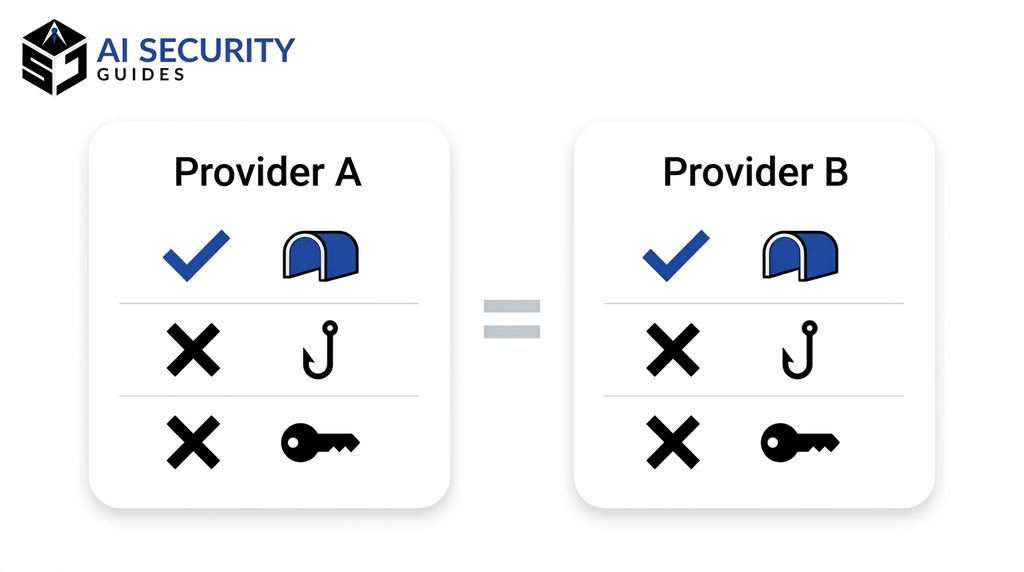
The table below compares the facts we verified. It does not rank the services, because the best choice depends on your needs and budget.
| Area | NordVPN | Proton VPN |
|---|---|---|
| Core job | Encrypts traffic and hides your IP address | Encrypts traffic and hides your IP address |
| Latest no-logs audit we found | Deloitte Lithuania, sixth engagement, late 2025 | Securitum, fifth annual audit, May 2026 |
| Free plan | No permanent free plan found; check current trial terms | Yes, with limits such as one device |
| Extra security tools | Threat Protection Pro on higher-tier plans | Ad and malware blocking on paid plans |
| Stops phishing and weak passwords | No | No |
| Fixes data breaches at other companies | No | No |
Notice the last two rows. No matter which brand you choose, the same limits apply. For both services, the answer to what does a VPN protect is the same: the connection. That is the point of this whole guide: the logo on the app does not change what the technology can do.
What Does a VPN Protect in Real-World Scenarios?
Rules are easier to remember when you see them in action. The four hypothetical examples below show what does a VPN protect, and where it stops, in situations you probably face. Each one is invented to illustrate a point, so none of them describes a real person.
What does a VPN protect at a coffee shop?
Hypothetical example: Priya works from a busy coffee shop twice a week. She connects to the shop’s Wi-Fi, switches on her VPN, and checks her work email. Because the VPN encrypts her traffic, other customers on the network cannot watch which sites she opens. The shop’s router also cannot log her browsing in a readable form. Priya’s case shows what does a VPN protect in daily life.
That is exactly the situation where a VPN shines. However, Priya still needs to keep her laptop updated and lock her screen when she walks to the counter. Someone standing behind her can read her screen no matter what software she runs. Physical privacy sits outside the tunnel entirely.
What does a VPN protect during online banking?
Hypothetical example: Marcus logs in to his bank from his living room on a VPN. His bank already uses HTTPS, so the login was encrypted before the VPN touched it. The VPN adds a second layer of encryption and hides his home IP address from the bank’s public website.
So what does a VPN protect here? It protects a little extra privacy, but it adds only modest security. The bigger risks for Marcus are a stolen password or a fake bank text. A VPN might even trigger a security check, because banks sometimes flag logins from unfamiliar locations. If that happens, follow the bank’s verification steps and do not panic.
What a VPN cannot protect against a suspicious text message
Hypothetical example: Elena receives a text that says her package is stuck and asks her to pay a small fee through a link. Her VPN is on. She taps the link, lands on a convincing page, and starts to type her card number.
The VPN did not help at all. What does a VPN protect against a scam link? Nothing. It encrypted her traffic to the scam site just as well as it would encrypt traffic to a real store. This example shows why habits matter more than software. Elena should have gone to the carrier’s official site instead of using the link. Our guide on what phishing is explains how to verify messages like this one.
Shopping while you travel
Hypothetical example: Sam is abroad and wants to buy a gift from his usual online store. His hotel Wi-Fi is slow, and the store shows different prices for his current location. He uses a VPN server in his home country, and the store treats him like a local customer again.
The VPN solved a location problem, not a security problem. Ask what does a VPN protect in that case, and the answer is mostly your location. Some stores dislike this practice and may limit orders from VPN addresses. In addition, payment fraud protection depends on your card issuer, not your VPN. Use a card with strong fraud protection, and review the store’s terms before you rely on a VPN to change what you see.
Do You Need a VPN? When It Helps and When It Doesn’t
Not everyone needs a VPN, and the honest answer depends on your goals. If you ask what does a VPN protect and the answer does not match any problem you have, you can skip the subscription. If it matches a real need, however, a good VPN is worth the cost. This section helps you decide.
When a VPN is worth it
A VPN makes sense in a few clear cases. You travel often and use hotel or airport networks. You work from public places. You want privacy from your internet provider. You live in or visit a place where local networks restrict content, and the law allows you to use a VPN. In those cases, what does a VPN protect? Your connection and your address, and that solves a real problem.
A VPN can also help small teams. For example, a company may use a business VPN to let employees reach internal tools safely. That is a different product from a consumer VPN, and it comes with its own setup. If you run a small business, ask an IT professional before you buy anything.
When you can skip a VPN
You may not need one if you mostly browse from home, use HTTPS sites, and keep your devices updated. In that case, a VPN adds modest privacy and almost no extra security. Your money may work harder elsewhere, such as on a password manager or a hardware security key.
Remember that a VPN does not replace the basics. If you have weak passwords, no multi-factor authentication, and outdated software, fix those first. They cause far more harm than an unencrypted coffee shop connection. In short, what does a VPN protect if your accounts are weak? Only the road, not the house.
What a VPN protects compared with other tools
It helps to compare a VPN with the other tools in your toolkit. Each one covers a different gap, so they work best together. The list below shows the main roles.
- VPN: protects the connection from snooping and hides your IP address.
- Password manager: protects your accounts from weak and reused passwords.
- Multi-factor authentication: protects your accounts if a password leaks.
- Antivirus and updates: protect your device from malware and known flaws.
- Careful habits: protect you from phishing and scams, which no tool fully blocks.
Seen this way, a VPN is a good specialist, not a general practitioner. It is excellent at one job, and it needs partners for the rest.
How to Choose a VPN That Protects Your Privacy
Picking a VPN is a trust decision. You are handing a company a view of your internet traffic, so choose with the same care you would use for a bank. The checklist below turns that idea into practical steps. Use it for NordVPN, Proton VPN, or any other service you consider. Knowing what does a VPN protect also tells you which features to demand.
First, look for independent audits. A company that publishes audit reports from known firms gives you something to verify. Read the summary, and note the date, the scope, and the firm that did the work. In addition, check whether the provider explains its ownership, its location, and how it handles legal requests.
Next, read the privacy policy. Look for plain statements about what the company logs, what it shares, and who it works with. Vague language is a warning sign. Then check the app permissions on your phone. A VPN needs permission to create a network connection, but it should not need your contacts or your photos.
After that, confirm the technical basics. Choose an app with a kill switch, leak protection, and modern protocols. Leak protection stops your real IP address or DNS requests from escaping outside the tunnel. You can test for leaks with a free online leak-test site once you are connected.
Finally, think about the business model. If a service is free and offers no clear way to pay for itself, ask where the money comes from. The FTC’s advice still applies: research the app, review its permissions, confirm that it encrypts your data, and check whether it shares information with others. In short, what does a VPN protect if the provider itself cannot be trusted? Nothing.
Checklist: What Does a VPN Protect in Your Daily Routine?
Use this checklist to match the tool to the situation, especially when you wonder what does a VPN protect at that moment. It keeps the VPN in its proper place, which is one layer among several.
- Turn the VPN on when you use public Wi-Fi, hotel networks, or any network you do not control.
- Check the connection after waking your device, because VPNs sometimes fail to reconnect.
- Enable the kill switch and test it once, using the airplane-mode trick described earlier.
- Look for HTTPS on every page where you log in or enter personal details.
- Use a password manager and a unique password for each account.
- Turn on multi-factor authentication for email, banking, and social media.
- Pause before you click on messages that create urgency, and verify them through another channel.
- Keep your device updated, including your browser, your phone, and your security software.
- Review app permissions on your phone every few months.
- Check for breaches by searching your email address on a trusted breach-notification site.
If you follow only three steps, choose these: use a password manager, turn on multi-factor authentication, and update your devices. They protect you from far more real-world harm than a VPN does. Add the VPN on top when your situation calls for it.

Frequently Asked Questions
What does a VPN protect me from?
A VPN protects your connection. It encrypts the traffic between your device and the VPN server, so people on the same network and your internet provider cannot read it easily. It also hides your IP address from websites. It does not protect you from phishing, malware, weak passwords, or data breaches.
What does a VPN protect on my phone?
On a phone, a VPN protects the network traffic that your apps and browser send, whether you use Wi-Fi or mobile data. It does not stop apps from collecting data you have allowed them to collect. It also does not replace phone updates, strong passwords, or careful permission settings.
Does a VPN protect me from hackers?
Only from some of them. A VPN helps against attackers who try to snoop on the network you share. However, it does not stop hackers who steal passwords through phishing, install malware, or break into a company that stores your data. Therefore, pair it with other security habits. In that case, what does a VPN protect? Only the network leg of the attack.
Is a free VPN safe?
Some are, and many are not. Free apps need income, and some earn it by collecting or selling data. A free plan from a provider that publishes independent audits, such as Proton VPN’s free tier, carries less risk than an unknown app. Even then, check the current limits and read the privacy policy.
Do I need a VPN at home?
Usually not for security. Your home network already uses your router’s encryption, and HTTPS protects most websites. A VPN at home makes sense if you want privacy from your internet provider or you need to reach a service from another region. Without such a goal, other steps, such as router updates, offer more value. At home, what does a VPN protect that your router and HTTPS do not already cover? Mostly privacy from your provider.
Can a VPN make me anonymous?
No. A VPN hides your IP address, but your accounts, cookies, browser fingerprint, and payment details can still identify you. The VPN provider also knows your real IP address while you are connected. Anonymity requires much more than a VPN, and most everyday users do not need it. What does a VPN protect about your identity? Only your IP address.
Conclusion: What Does a VPN Protect, and What Doesn’t It?
So, what does a VPN protect? It protects the connection between your device and the VPN server. It hides your traffic from people on shared Wi-Fi and from your internet provider, and it hides your real IP address from websites. Those are real benefits, especially when you travel or use networks you do not control.
However, a VPN does not protect you from phishing, malware, weak passwords, data breaches, or tracking that relies on your accounts. It also moves trust to the VPN company, which makes provider choice important. NordVPN and Proton VPN both publish independent audit information, but neither one removes the limits described in this guide.
Start with the basics: strong passwords, multi-factor authentication, software updates, and careful clicking. Then add a trustworthy VPN where it fits your life. When you ask what does a VPN protect, remember the short answer: your connection, not your whole digital life. For your next step, read our guide on how to use a password manager and lock down the accounts that matter most.